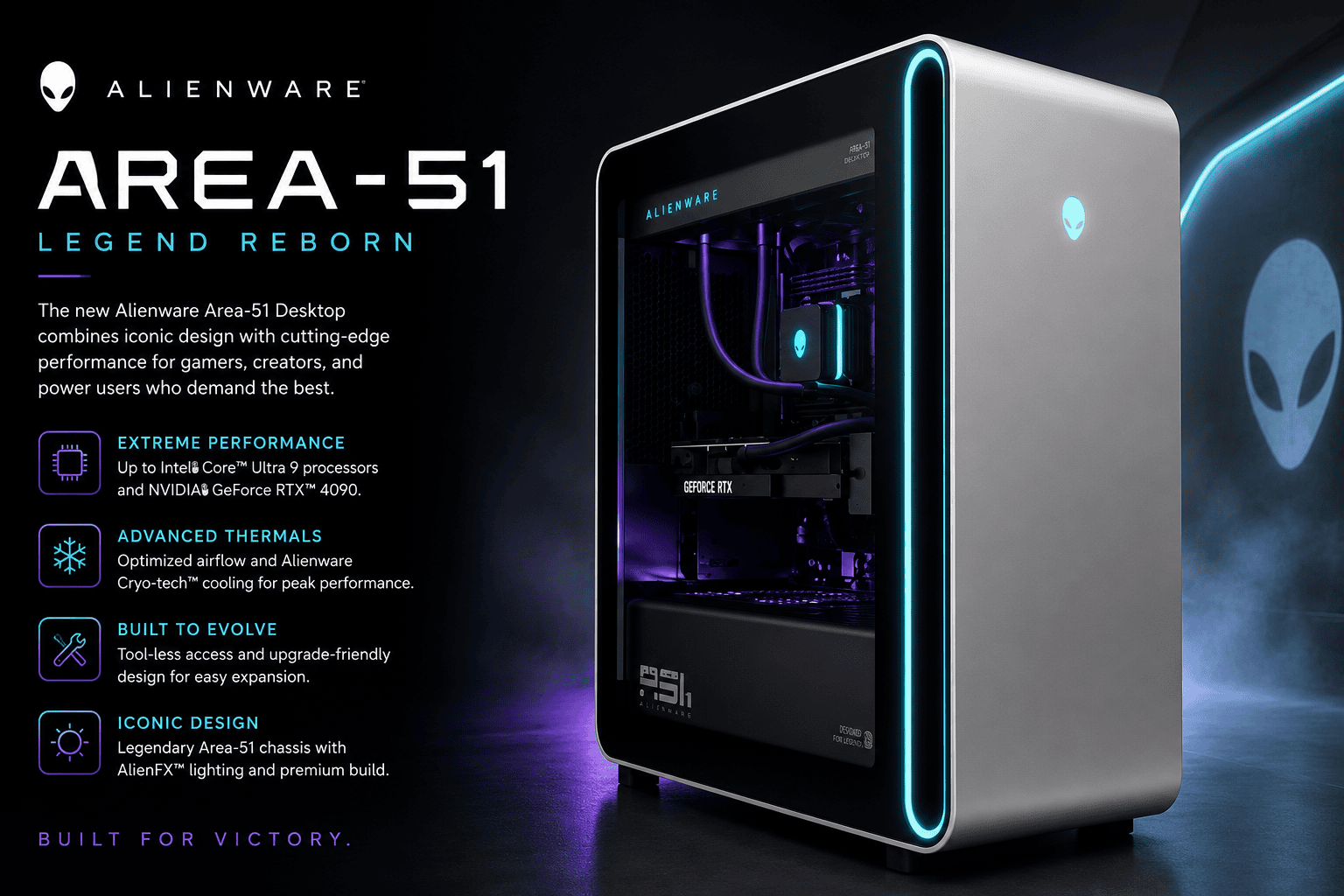
Alienware Area-51 returns as an 80-litre gaming desktop built for RTX 5090 and future upgrades
The Alienware Area-51 has returned as Dell’s flagship full-size gaming desktop, combining an 80-litre chassis with Intel Core Ultra processors, NVIDIA GeForce RTX 50 Series graphics and a design that places much greater emphasis on user upgrades than previous Alienware desktops.
Dell currently sells the Intel-based Alienware Area-51 AAT2250 with processor options reaching the 24-core Intel Core Ultra 9 285K and graphics extending to the GeForce RTX 5090 with 32GB of GDDR7 memory. Depending on configuration, buyers can also select RTX 5070, RTX 5070 Ti and RTX 5080 graphics.
The Area-51 name itself is considerably older than this generation. Alienware traces it back to 1998, and Dell revived the desktop at CES 2025 after a period away from the company’s current gaming range. The new system is intended to serve as Alienware’s highest-end desktop platform rather than simply another specification update to the smaller Aurora family.
TechnologyBlog.co.za has not tested the Alienware Area-51 AAT2250. This article therefore focuses on its verified specifications, cooling architecture and upgrade options rather than making conclusions about gaming performance, acoustics or temperatures.
Area-51 is a full-size 80-litre gaming tower
The first thing buyers need to understand about the current Area-51 is its size.
Dell describes it as an 80-litre full-sized tower. The AAT2250 measures approximately 569mm high, 231.6mm wide and 610.5mm deep, with maximum configured weight reaching about 34.5kg.
That makes it a desktop designed around expansion and cooling capacity rather than compactness.
The larger enclosure gives Dell space for high-power graphics cards, substantial liquid-cooling hardware, multiple storage devices and power supplies reaching 1,500W.
It also means buyers need to check their physical setup before ordering. An Area-51 is unlikely to fit comfortably into small under-desk PC compartments designed around conventional office towers.
Intel Core Ultra 9 285K sits at the top of the AAT2250 range
Current configurations can be equipped with processors including the Intel Core Ultra 7 265K, Core Ultra 9 285 and Core Ultra 9 285K.
The Core Ultra 9 285K sits at the top of Dell’s current Intel configurator. It provides 24 CPU cores, 76MB of total cache and boost frequencies reaching 5.7GHz.
Dell pairs these processors with liquid CPU cooling rather than a conventional small air cooler.
Depending on the chassis configuration, the Area-51 can use a 240mm or 360mm liquid-cooling system. Higher-end configurations currently pair the 360mm cooler with Dell’s 1,500W Platinum-rated power supply.
The processor selected will affect gaming and productivity performance, but buyers should avoid choosing a CPU purely because it is the most expensive option. The GPU, display resolution and workloads being used will also determine how much benefit the higher-tier processor provides.
RTX 5090 brings 32GB of GDDR7 to the highest configuration
Graphics options now span much of NVIDIA’s GeForce RTX 50 Series.
Dell’s current configurator lists:
- GeForce RTX 5070 with 12GB GDDR7
- GeForce RTX 5070 Ti with 16GB GDDR7
- GeForce RTX 5080 with 16GB GDDR7
- GeForce RTX 5090 with 32GB GDDR7
The RTX 5090 represents the maximum configuration and gives the Area-51 enough graphics hardware for demanding high-resolution gaming, GPU rendering and supported AI workloads.
However, an Area-51 with an RTX 5090 should not automatically be treated as necessary for every gamer. Display resolution, refresh rate, game choice and workload all matter when deciding whether the higher GPU tier is justified.
TechnologyBlog.co.za has not benchmarked the Area-51 and therefore cannot assign expected frame rates to these configurations.
Positive-pressure airflow changes how the tower is cooled
Cooling is one of the most unusual parts of the Area-51 design.
Rather than relying on a traditional arrangement of intake fans at the front and dedicated exhaust fans at the rear, Alienware designed the Area-51 around positive-pressure airflow.
Fans push filtered cool air into the chassis. The resulting pressure then drives heated air towards passive exhaust areas at the back of the case. Dell lists positive-pressure airflow as one of the defining features of the 80-litre platform.
At launch, Alienware explained that the design was built around directing large volumes of cool air towards high-power components while reducing the restrictions created by a conventional exhaust-fan arrangement.
The system can use multiple large intake fans alongside its liquid CPU cooler.
Actual thermal performance and noise depend on configuration, ambient temperature and workload, so manufacturer airflow design should not be confused with an independent thermal test.
Dell has moved away from highly proprietary upgrade parts
Perhaps the most significant Area-51 change has little to do with frame rates.
Alienware designed the new system around substantially more industry-standard PC components.
Dell says important parts including the motherboard, power supply, CPU, GPU, RAM, storage and fans can be replaced or serviced. This is a major philosophical change for a brand whose previous desktops were often criticised for proprietary motherboard layouts and power supplies.
The Area-51 supports standard ATX and micro-ATX motherboard dimensions, while standard fan mounting positions provide more freedom when replacing cooling hardware.
There is still Alienware-specific integration inside the machine. Dell uses a daughterboard to manage functions such as lighting, fans, front I/O and power controls. Dell said it would provide a conversion kit where users wanted to replace the original motherboard with a third-party board.
This makes the Area-51 more upgrade-friendly than many previous Alienware desktops without turning it into an entirely generic self-built PC.
The chassis leaves space for very large graphics cards
The 80-litre enclosure is intended to accommodate current and future high-end hardware.
Alienware designed it with enough room for graphics cards reaching roughly 450mm in length and four slots in thickness, according to launch specifications.
That additional clearance matters as premium desktop GPUs become increasingly large.
It also gives owners more flexibility if they replace the factory graphics card later in the machine’s life.
Compatibility still needs to be checked before an upgrade. Physical dimensions are only one consideration; power-supply capacity, connectors, cooling requirements and motherboard compatibility also matter.
850W and 1,500W power-supply options are available
Current configurations vary substantially in power requirements.
Dell lists an 850W Gold-rated power supply on selected configurations and a 1,500W Platinum-rated power supply for higher-end builds.
The larger supply makes sense when the Area-51 is configured with high-power processors and graphics cards such as the RTX 5090.
It also has consequences for South African users running gaming systems from inverters, UPS units or battery backup.
A 1,500W power-supply rating does not mean the PC continuously consumes 1,500W. The power supply describes its available capacity, while actual consumption changes according to the components and workload.
Even so, a high-end Area-51 under sustained gaming or rendering load can place a significant demand on backup power.
South African buyers planning to run the system during power interruptions should size their inverter, battery and UPS equipment according to the complete PC and display setup rather than looking only at the PSU label.
Up to 64GB of DDR5 memory
Dell currently offers 32GB and 64GB DDR5 configurations on the Intel Area-51.
Selected 32GB configurations use two 16GB DDR5 XMP modules running at up to 7200MT/s with Intel 200S Boost, while Dell also lists 64GB dual-channel configurations at 6400MT/s.
The exact memory implementation therefore depends on the SKU.
For gaming alone, memory capacity beyond 32GB may not always provide a meaningful benefit. Larger capacities become more relevant to demanding content creation, virtual machines, development environments and other memory-heavy workloads.
PCIe Gen5 storage is available
Storage options include PCIe Gen5 NVMe SSDs.
Dell’s current US configurations include 1TB and 2TB Gen5 drives, with larger 4TB choices and multi-drive configurations also appearing in the configurator.
The motherboard provides three M.2 storage positions.
Dell identifies the first M.2 slot as supporting up to PCIe Gen5, while the second and third slots support up to Gen4 in the current specification.
That gives owners a practical upgrade path without immediately replacing the original SSD.
Launch information also listed conventional 2.5-inch and 3.5-inch drive positions for additional storage.
Thunderbolt 4 is included on the rear
The Area-51 provides an unusually large collection of external connections.
Top-panel connections include:
- microphone input;
- line output;
- two USB 3.2 Gen 1 Type-A ports;
- two USB 3.2 Gen 2 Type-C ports with PowerShare.
The rear includes:
- two Thunderbolt 4 ports;
- two USB 3.2 Gen 2 Type-C ports;
- one USB 3.2 Gen 1 Type-A port;
- several USB 2.0 ports;
- optical S/PDIF output;
- line input and output;
- 2.5 Gigabit Ethernet.
Display outputs depend on the installed graphics card rather than the chassis itself.
The combination of Thunderbolt 4, multiple USB-C connections and 2.5GbE makes the machine more versatile for users who also connect fast external storage, capture hardware or creator peripherals.
Wi-Fi 7 and Bluetooth 5.4 are built in
Wireless connectivity comes through Intel Killer Wi-Fi 7 hardware with Bluetooth 5.4.
The listed Wi-Fi adapter supports 2×2 MIMO and 320MHz operation on compatible networks.
Reaching Wi-Fi 7 speeds requires a suitable Wi-Fi 7 router or access point and favourable wireless conditions.
For a fixed high-end gaming desktop, the wired 2.5GbE connection may still be preferable where Ethernet cabling is available, particularly for large game downloads and latency-sensitive online gaming.
Dell’s official Area-51 configuration page confirms the AAT2250 model and current processor, graphics, memory and storage options, including GeForce RTX 5090 configurations. For GPU context, see our GeForce RTX 5090 guide and RTX 50 Series overview.
Alienware Area-51 AAT2250 specifications
| Specification | Alienware Area-51 AAT2250 |
|---|---|
| Chassis | 80-litre full-size tower |
| Processor | Up to Intel Core Ultra 9 285K |
| Maximum listed CPU cores | 24 |
| Graphics | Up to NVIDIA GeForce RTX 5090 |
| RTX 5090 memory | 32GB GDDR7 |
| Memory | Up to 64GB DDR5 |
| Storage | Multiple NVMe SSD configurations |
| Primary SSD support | Up to PCIe Gen5 |
| M.2 slots | 3 |
| CPU cooling | 240mm or 360mm liquid cooling |
| Power supply | 850W Gold or 1,500W Platinum, depending on configuration |
| Airflow | Positive-pressure design |
| Networking | 2.5 Gigabit Ethernet |
| Wi-Fi | Wi-Fi 7 |
| Bluetooth | Bluetooth 5.4 |
| Thunderbolt | 2 × Thunderbolt 4 |
| Motherboard expansion approach | ATX-compatible design |
| Height | Up to 569mm |
| Width | Up to 231.6mm |
| Depth | Up to 610.5mm |
| Maximum listed weight | Approximately 34.5kg |
| Operating system | Windows 11 Home or Windows 11 Pro |
Specifications vary according to configuration. Dell’s Area-51 configurator should be checked for the exact processor, graphics card, memory, storage, cooling and power supply included with a specific order.
The Area-51 name dates back to 1998
Alienware is using Area-51 as more than a new model number.
The company says the name dates back to 1998 and historically represented its highest-end systems. Dell brought the branding back in 2025 for both desktop and notebook form factors.
The current desktop also reflects a shift in what Alienware believes high-end buyers expect.
Maximum specifications remain important, but upgradeability has become part of the product’s identity. Moving back towards standard motherboard dimensions, power supplies and fan mounts gives enthusiasts more opportunity to keep the machine useful after its original components become outdated.
That may prove more important to long-term ownership than a small difference in factory clock speeds.
The exact Area-51 configuration matters
A buyer should not treat “Alienware Area-51” as one fixed set of specifications.
Dell currently lists combinations ranging from the GeForce RTX 5070 through to the RTX 5090. Processor, SSD capacity, memory speed, power supply and liquid cooler can also change between configurations.
For example, Dell’s current RTX 5070 configuration can use an 850W power supply and 240mm CPU cooler, while higher-end RTX 5080 and RTX 5090 builds can be paired with the 1,500W Platinum PSU and 360mm cooler.
That makes the complete order code more useful than the Area-51 name alone when comparing retailer listings.
US pricing varies dramatically by configuration
Dell’s US Area-51 configurator showed build-your-own pricing starting at US$4,199.99 when checked on 2 September 2026. Higher-end preconfigured systems with RTX 5090 graphics, additional storage and more memory were listed substantially above that figure.
This is US pricing and should not be converted directly into rand.
South African pricing can be affected by VAT, distribution costs, exchange rates, shipping, regional configurations and warranty arrangements.
South African price and retail availability
Dell maintains a South African support section for the Alienware Area-51 AAT2250, including product documentation and troubleshooting resources.
However, a local support page does not prove that Dell is currently selling every AAT2250 configuration directly through its South African retail channel.
TechnologyBlog.co.za could not verify a current Dell South Africa retail listing with a confirmed rand price for the Area-51 AAT2250 at the time of publication.
South African pricing and retail availability had not been confirmed at the time of publication.
Local buyers considering an imported machine should confirm the exact configuration, warranty coverage and local service arrangements before purchasing.
Who is the Alienware Area-51 for?
The Area-51 is aimed at buyers who want considerably more than an entry-level gaming PC.
Its strongest use cases include high-resolution gaming, high-refresh gaming, streaming, GPU rendering, content creation and other workloads that can justify premium CPUs and RTX 50 Series graphics.
The renewed emphasis on standard components also makes the Area-51 more interesting to enthusiasts who plan to keep a system for several GPU or storage upgrade cycles.
There are clear practical drawbacks.
An 80-litre, 34kg-class tower takes up considerable space. The most powerful configurations also require substantial power and cooling, while pricing climbs rapidly when an RTX 5090, additional storage and higher memory capacity are selected.
For the right buyer, however, the most important change is not simply that Alienware can install an RTX 5090.
It is that the current Area-51 has been designed with a clearer route to replacing major components later. For a flagship gaming desktop expected to survive several hardware generations, that could be one of its most useful features.


