Claude: Benefits, Risks and Limitations
Claude becomes more useful and more consequential for the same reason: it is gaining access to real work. Coding agents, files, connectors and longer-running workflows can save substantial time, but they also allow an error to move beyond a chat response into a repository, document, connected app or automated action.
Capability and trust therefore have to be evaluated separately. A stronger model may reduce some errors while simultaneously enabling longer actions, broader tool use or more persuasive output. Risk depends on the job and the surrounding controls, not only the benchmark score.
For the broader product picture, see our complete Claude AI guide.
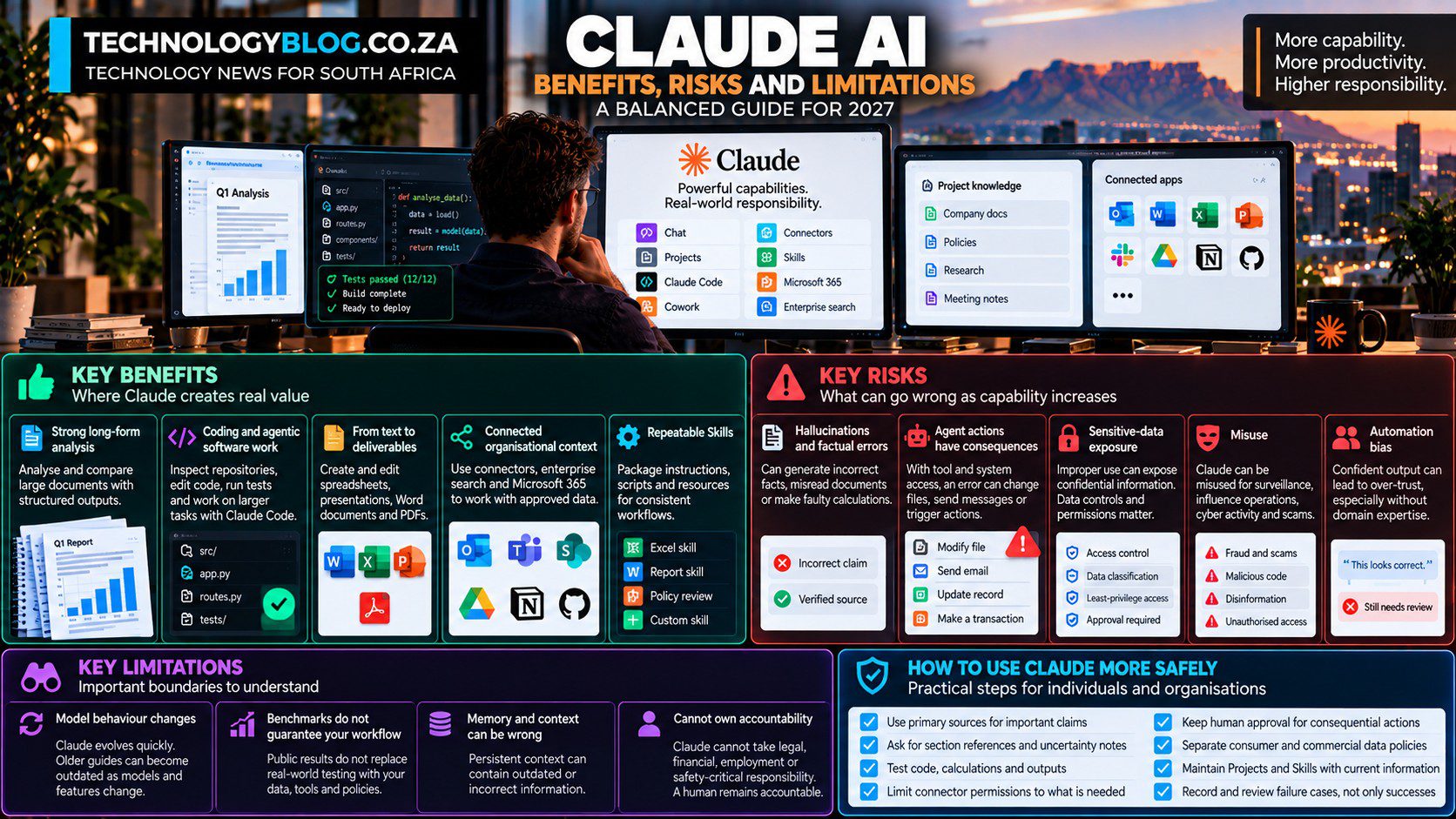
Benefit: strong long-form analysis
Claude is well suited to document-heavy work. Projects, large context windows and file handling make it possible to compare reports, summarise long source sets and produce structured outputs from extensive material.
The best workflows keep findings tied to the source. Asking Claude for section references and uncertainty notes makes the output easier to review.
Benefit: coding and agentic software work
Claude Code is one of the clearest examples of AI moving from suggestion to execution. It can inspect repositories, edit code, run tests and work across larger tasks.
Anthropic’s usage research shows that expertise still matters. Users with stronger domain knowledge tend to direct the agent more effectively, which argues against treating Claude as a replacement for software judgement.
Benefit: moving from text to deliverables
Claude can create spreadsheets, presentations, Word documents and PDFs. This reduces the manual step of copying AI text into production software.
For many businesses, that transition is more important than a small improvement in conversational quality because it affects the actual workflow.
Benefit: connected organisational context
Connectors, enterprise search and Microsoft 365 integrations let Claude work with approved data rather than relying only on public knowledge or pasted snippets.
This can make answers more relevant and reduce information-hunting time. It also makes access control more important because the assistant can only be as well governed as the permissions around it.
Benefit: repeatable Skills
Skills let users and organisations package a process into reusable instructions, scripts and resources. This can improve consistency across repeated workflows and reduce prompt variation.
The benefit is strongest when the skill is maintained like real process documentation rather than created once and forgotten.
Risk: hallucinations and factual errors
Claude can generate incorrect facts, misread a document, make faulty calculations or infer something not supported by the source. The answer can still sound polished.
That makes fluency a poor proxy for truth. Important public claims should be verified against primary sources, and calculations should be independently checked.
Risk: agent actions have consequences
An error in chat is contained until someone acts on it. An error from an agent with write access can change a file, send a message, alter a system or create a transaction.
This is why connector permissions, approval gates and least-privilege access matter. More capable agents increase the cost of weak controls.
Risk: sensitive-data exposure
Anthropic’s data practices differ between consumer and commercial products. Team and Enterprise data is not used for model training by default unless the organisation opts into a development programme. Consumer users have separate privacy controls.
Incognito chats are not saved to history or memory and Anthropic says they are not used for training, but they are still retained temporarily. No privacy feature should be interpreted as permission to ignore company policy or legal obligations.
Risk: misuse
Anthropic’s September 2026 threat-intelligence report documents attempts to use Claude for surveillance, influence operations, cyber activity, scams and other harmful work. The company says it disrupted the accounts and updated safeguards.
The important lesson is that general-purpose capability can be dual-use. The same coding and research skills that help legitimate users can also be attractive to malicious actors. TechnologyBlog’s report on Claude accessing real systems during cyber evaluations shows how agent risk can also emerge from permissions, containment failures and ambiguous task boundaries rather than malicious user intent alone.
Risk: automation bias
People can over-trust an assistant that writes confidently and completes tasks quickly. This is especially dangerous when the user lacks the expertise to detect subtle errors.
A strong workflow deliberately retains checkpoints. The more consequential the action, the stronger the required review.
Limitation: model behaviour changes
Claude is a rapidly changing product. Sonnet 5.5, Opus 5.5 and other 2026 models differ materially from earlier versions in speed, cost, tool use and safeguards.
An old tutorial can therefore be wrong even if it was accurate when published. Time-sensitive feature information belongs in a dated update record such as Claude Latest Features and Updates, while evergreen guides should stay focused on durable behaviour and risks.
Limitation: benchmarks do not guarantee your workflow
Anthropic publishes benchmark results for coding, computer use and knowledge work. Those measurements are useful signals, but they do not reproduce a company’s specific data, tools, policies or review process.
Businesses should run representative internal evaluations before standardising on a model or workflow.
Limitation: memory and context can be wrong
Persistent context saves time, but incorrect context can also persist. A Project or memory system containing outdated policy can make Claude consistently wrong in a way that looks coherent.
Source hygiene matters more as AI uses more persistent context.
Limitation: Claude cannot own accountability
Claude can prepare a recommendation, but the organisation or person still owns the decision. Legal, financial, employment, medical, security and safety-critical outcomes require accountable human judgement.
How to use Claude more safely
- Use primary sources for important factual claims.
- Ask Claude to cite the source section supporting its answer.
- Test code and calculations.
- Limit connector permissions to what the task needs.
- Keep approval steps for consequential actions.
- Separate consumer and commercial data policies.
- Maintain Projects and Skills so their context stays current.
- Record and review failure cases, not only successful demos.
Claude is safer when the task has visible boundaries
Claude is powerful because it can increasingly move from conversation into execution. That is also why the risk profile is changing. Better models reduce some errors but expand what the system can do.
The right approach is neither blind trust nor blanket avoidance. Use Claude where the task is reviewable, control the information and permissions around it, and match human oversight to the cost of failure.
For business governance, continue with Claude for Business. For comparison with other assistants, see Claude vs the Leading Alternatives. For time-sensitive model and safeguard changes, use Claude Latest Features and Updates.