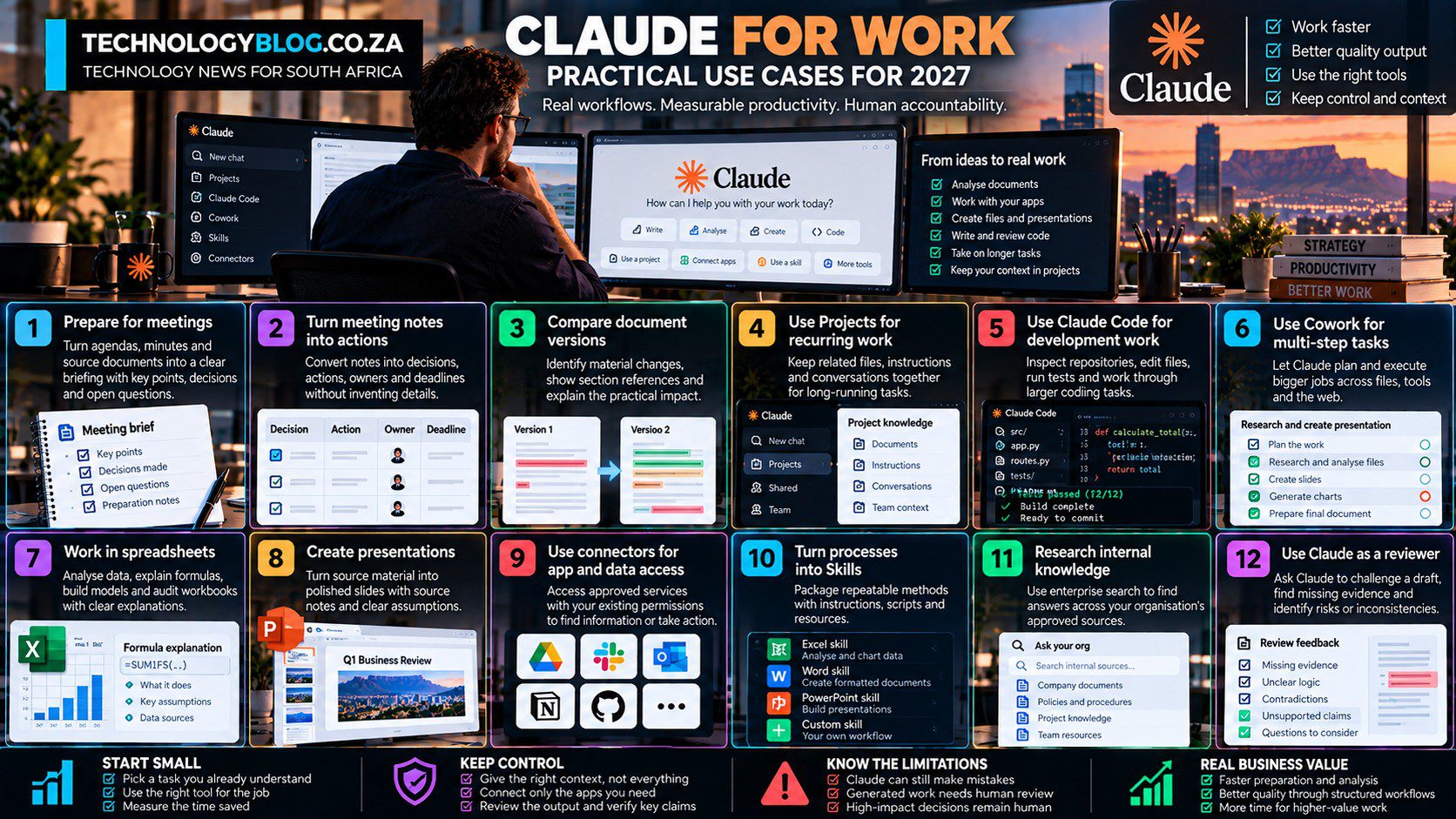
Claude for Work: Practical Ways to Save Time
Claude can make a task look fast long before the work is actually finished. A draft may appear in seconds and still create half an hour of checking. The strongest workplace use cases are therefore repeatable workflows where Claude removes preparation, transformation or execution work while the employee can still verify the result and remains accountable for it.
Anthropic’s 2026 product direction makes this easier because Claude now spans ordinary chat, Claude Code, Cowork, projects, connectors, skills and office integrations. The productivity opportunity is therefore broader than drafting email.
For the product overview, see our complete Claude AI guide for 2027.
Use Claude to prepare work before meetings
Give Claude the agenda, previous minutes and relevant source documents. Ask for a one-page briefing that separates decisions already made from decisions still required.
This works well because the employee can verify every point against the source material before the meeting begins.
Turn meeting notes into actions
After the meeting, Claude can transform notes into decisions, actions, owners and deadlines. The key instruction is not to invent missing owners or dates.
A useful output format is a table with “decision”, “action”, “owner”, “deadline” and “source note”. That makes omissions visible.
Compare document versions
Claude can compare two policies, contracts, proposals or technical documents and identify material differences. Ask for section references and practical impact rather than a generic summary.
This can save time in review-heavy roles because the human can focus on changed clauses instead of rereading every unchanged paragraph.
Use Projects for recurring accounts or workstreams
A Project can hold the relevant context for a client, product, research programme or internal process. This reduces repeated setup and helps keep unrelated work separated.
The user should still maintain clean source material. Persistent context is useful only when the context is accurate and current.
Use Claude Code for implementation-heavy work
Developers can use Claude Code to inspect repositories, implement changes, run tests, debug errors and work through longer tasks.
Anthropic’s research on roughly 400,000 Claude Code sessions found that more experienced users still achieved better outcomes. That supports a practical lesson: the tool can accelerate execution, but expertise remains valuable for planning, architecture and review.
Use Cowork when the task spans several steps
Cowork can take a broader assignment and work through files, tools and deliverables. Instead of asking Claude to summarise a report, then separately make a spreadsheet, then separately draft a presentation, the user can frame the overall goal.
The value comes from reducing handoffs. The risk comes from giving an agent more freedom to act. Review points should therefore be deliberate.
Use Claude in spreadsheets where explanation matters
Claude’s Excel work can help explain formulas, audit workbooks, build models and perform analysis. Anthropic has continued expanding Excel capabilities and connectors for financial data.
The right workflow asks Claude to show what changed and why. Silent spreadsheet edits are difficult to audit, especially in finance.
Create presentations from source material
Claude can turn source documents into slides and produce PowerPoint files. The time-saving opportunity is not merely slide generation; it is preserving the factual chain from the underlying source to the presentation.
Ask for source notes per slide and a list of assumptions that require review.
Use Claude to research inside approved organisational data
Connectors and enterprise search can help employees find information scattered across documents, messages and project systems.
This is useful when the organisation already has the answer but employees spend time locating it. Search quality still depends on permissions and source quality.
Turn repeated processes into Skills
Skills can encode an internal method: how to review a customer ticket, prepare an operating report, check a product article or assemble a weekly project summary.
This turns Claude from an ad hoc assistant into a workflow tool. The organisation should maintain the skill like any other process documentation and update it when the real process changes.
Use Claude as a reviewer, not only a writer
One of the most valuable uses is asking Claude to challenge a draft. It can identify missing evidence, unclear logic, contradictions, unsupported claims or reader questions.
For high-quality knowledge work, review is often more useful than generating another version from scratch.
Measure total time saved
Anthropic’s own internal research reported substantial self-reported productivity gains among employees using Claude, but also found that fully delegating work without supervision remained limited. That distinction matters.
A workplace should measure generation time, review time, correction time and output quality together. A 20-second draft that takes 30 minutes to repair has not improved productivity.
Where Claude does not save time
Claude can become counterproductive when the employee lacks enough expertise to review the answer. If every sentence requires independent research, a generated draft may create more verification work than it removes.
High-risk decisions also require stronger review. Employment, legal, financial, cybersecurity and safety-critical work should not be treated like routine formatting.
Workplace privacy matters
Anthropic says data from Team and Enterprise commercial products is not used for model training by default unless the organisation voluntarily participates in a development programme. Organisations still control their own users, policies and permissions.
South African employers should also consider POPIA, employee information, client confidentiality and internal data classification before connecting work systems to an AI agent.
Measure the handoff, not the novelty
Use Claude to accelerate preparation, transformation and execution. Keep humans accountable for consequential judgement.
That line is likely to move as Claude becomes more capable, but it remains a useful default. For broader organisational deployment, continue with Claude for Business. For feature selection, see Best Claude Tools and Use Cases; for the failure modes that matter as permissions expand, see Claude: Benefits, Risks and Limitations.
Use Claude to make handovers more complete
Project handovers often lose context because the original employee knows which details matter but the replacement does not. Claude can turn notes, tickets, documents and decisions into a structured handover that separates current state, unresolved risks, dependencies and next actions.
The result should still be reviewed by the person handing over the work. AI is useful for structure; only the human knows whether the handover actually captures the tacit context a colleague will need.