Best Claude Tools and Use Cases in 2027
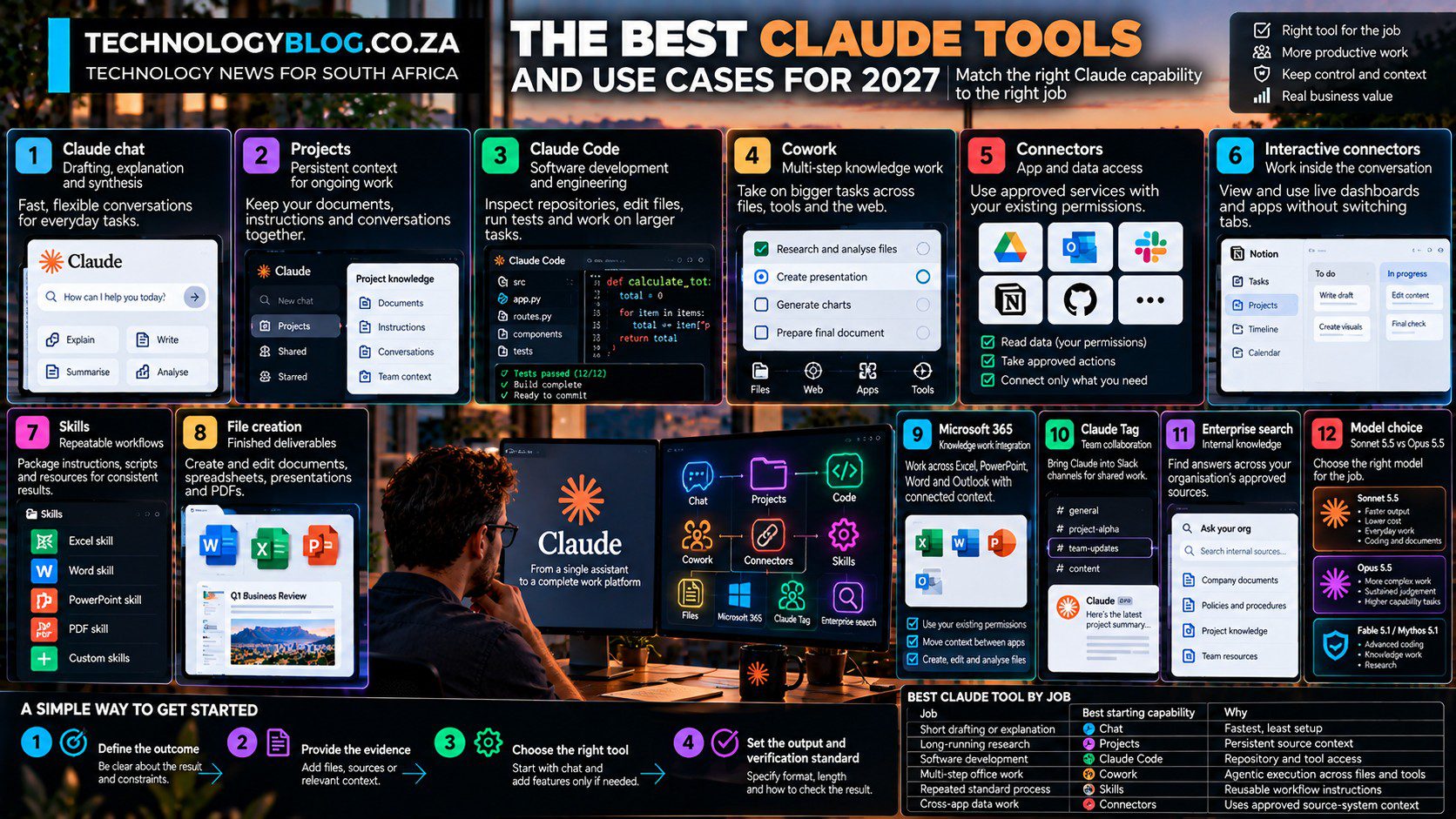
Claude has accumulated enough tools that feature count is no longer useful guidance. Chat, Projects, Claude Code, Cowork, connectors, Skills and Microsoft 365 integrations solve different problems. The useful question is which capability removes a measurable bottleneck without adding unnecessary context, permissions or review burden.
This guide works backwards from the job. Anthropic’s 16 September rollout also means some Pro and Max users no longer see chat and Cowork as separate modes; Claude can choose between a quick response and longer task execution inside one conversation. The capability map still matters because Projects, Code, connectors and Skills change what context and actions are available even when the interface hides the old mode boundary. For the wider model and product map, see our complete Claude AI guide for 2027.
1. Claude chat for drafting, explanation and synthesis
Standard Claude chat remains the fastest option for a self-contained task. It works well for explaining a concept, rewriting a passage, brainstorming, summarising provided material or structuring notes.
The key is to keep the task bounded. If the work requires long-lived context, multiple tools or repeated actions, another Claude surface may be more appropriate.
2. Projects for persistent context
Projects provide a dedicated workspace with their own chat history and knowledge base. This is useful when the same documents or instructions will be referenced repeatedly.
Examples include a product-research project, an academic literature review, a client account, a long-running software project or an internal policy workspace.
Projects are especially valuable when consistency matters because the user can centralise source documents instead of pasting them repeatedly.
3. Claude Code for software development
Claude Code is Anthropic’s specialised coding agent. It can inspect repositories, edit files, run tests and work through larger engineering tasks.
Anthropic’s 2026 research on Claude Code usage suggests the human often determines the plan while Claude handles more of the implementation. That makes it a strong execution tool for developers who can still review architecture, tests and edge cases.
4. Cowork for multi-step knowledge work
Cowork takes Claude beyond a single response. It can use files, connectors, skills, browser or computer capabilities and create deliverables across a longer task.
Good use cases include preparing research packs, building presentations, reviewing document sets, coordinating repetitive office work and producing formatted outputs from source material.
5. Connectors for app and data access
Connectors let Claude retrieve information from supported apps and, where permitted, take actions. Anthropic says Claude inherits the user’s permissions from the source service.
The value is context. A project-status question becomes more useful when Claude can read the relevant task board, documents and messages instead of relying on copied snippets.
The risk is also context. The more systems connected, the more important least-privilege access and human confirmation become.
6. Interactive connectors for work inside the conversation
Anthropic now supports interactive connectors that can display live dashboards, task boards and other app interfaces within a Claude conversation.
This is useful when the user needs to inspect, filter or modify structured information without switching away from the assistant. It can also make agent actions more transparent because the user can see the interface being changed.
7. Skills for repeatable workflows
Skills package specialised instructions, code and resources. Anthropic provides built-in skills for Excel, Word, PowerPoint and PDF work, and users can create custom skills.
Skills are most valuable when a workflow is stable. A legal-review skill, editorial fact-checking skill or financial-model skill can encode the steps and quality gates that would otherwise need to be restated in every prompt.
8. File creation for finished deliverables
Claude can create actual documents, spreadsheets, presentations and PDFs. This is more useful than receiving plain text when the user ultimately needs a file.
A strong workflow asks Claude to create the file and explain the key assumptions, formulas or sources so the deliverable remains reviewable.
9. Microsoft 365 integrations for knowledge work
Anthropic has expanded Claude across Excel, PowerPoint, Word and Outlook in 2026. In financial-services workflows, the company describes Claude moving context between applications so a model built in Excel can feed into a presentation or memo without restarting from scratch.
These integrations matter because they move AI closer to the work surface rather than forcing employees to shuttle content through a browser chat.
10. Claude Tag for team collaboration
Claude Tag brings the agent into Slack channels for Team and Enterprise users. Team members can tag Claude, give it access to selected channels and tools, and delegate a task inside the shared conversation.
This is a different interaction model from individual chat. The context is collaborative and visible to the team, which can make handoffs and shared work easier.
11. Enterprise search for internal knowledge
Anthropic’s enterprise-search feature gives Team and Enterprise organisations a dedicated “Ask Your Org” project tied to approved knowledge sources.
This addresses a common enterprise problem: the answer exists, but employees do not know where. The usefulness depends on clean source permissions and good internal documentation.
12. Model choice: Sonnet 5.5 versus Opus 5.5
Anthropic positions Sonnet 5.5 as a faster, lower-cost option for well-scoped everyday tasks, coding and document work. Opus 5.5 is aimed at more complex, open-ended tasks requiring sustained judgement.
The model is therefore another tool choice. Routine work may not need the most expensive or deepest reasoning model. Complex planning or high-stakes analysis may justify it.
Learn the tool that removes your current bottleneck
- Start with chat and file uploads.
- Use Projects when context needs to persist.
- Add Skills when a workflow repeats.
- Use connectors only when external context materially helps.
- Move to Cowork when the work has several steps.
- Use Claude Code if the job is genuinely software development.
That order keeps the tool stack proportional to the task. More automation is not automatically better. For concrete task examples, continue to 10 Things You Can Do With Claude; for risk boundaries, use Claude: Benefits, Risks and Limitations.
Best Claude tool by job
| Job | Best starting capability | Why |
|---|---|---|
| Short drafting or explanation | Chat | Fastest, least setup |
| Long-running research | Projects | Persistent source context |
| Software development | Claude Code | Repository and tool access |
| Multi-step office work | Cowork | Agentic execution across files and tools |
| Repeated standard process | Skills | Reusable workflow instructions |
| Cross-app data work | Connectors | Uses approved source-system context |
For practical everyday examples, continue with 10 Things You Can Do With Claude. For workplace deployment, see Claude for Work.