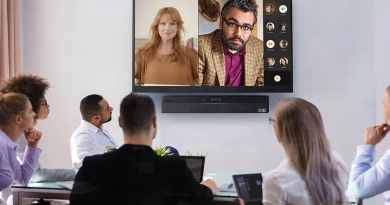
Yealink MeetingBar A25 with CTP25 brings triple 4K cameras to huddle rooms
The Yealink MeetingBar A25 with CTP25 is an Android-based video conferencing system designed for focus and huddle rooms with up to five participants. It combines an all-in-one video bar with a dedicated 10.1-inch touch controller for starting meetings, controlling calls and connecting laptops for content sharing or BYOD conferencing.
The MeetingBar A25 uses three 4K cameras to provide a 151° horizontal field of view. It also contains eight MEMS microphones, a built-in 10W speaker and AI-assisted video and audio features.
Yealink pairs the system with its CTP25 touch console to give meeting-room users a dedicated control surface instead of requiring them to operate meetings from the video bar or a separate computer.
TechnologyBlog.co.za has not tested the MeetingBar A25 and CTP25. This article therefore focuses on their verified specifications, features and intended deployment rather than providing a performance review.
Triple 4K cameras cover compact rooms
The MeetingBar A25 uses a three-camera system designed for rooms where participants sit relatively close to the display.
Its ultra-wide camera provides a 151° horizontal field of view and 182° diagonal field of view. Two additional telephoto cameras provide narrower views that support Yealink’s intelligent framing features.
Each camera uses an 8-megapixel sensor. The system supports video output at up to 3840 × 2160 at 30 frames per second, with 1080p available at up to 60fps.
The unusually wide field of view is useful in small rooms because the camera does not need to sit far away from participants to fit everyone into the frame.
Yealink recommends the A25 for spaces with up to five people.
CTP25 provides dedicated meeting controls
The CTP25 is an important part of this configuration rather than simply an optional interface mentioned alongside the video bar.
It uses a 10.1-inch touchscreen and acts as the room’s main meeting controller. Users can start and manage calls from the console while leaving the main display dedicated to meeting content and remote participants.
Yealink supports both direct wired connectivity between the CTP25 and MeetingBar A25 and IP-based deployment.
A direct connection requires only a Cat5e cable between the bar and console. That cable provides network connectivity and power to the CTP25, reducing the number of separate power adapters and network cables required around the meeting table.
Signing in through the touch console can also synchronise the room system, simplifying deployment.
USB-C turns the CTP25 into a BYOD connection point
The CTP25 also provides the connection between a user’s laptop and the room system.
A USB-C cable from the touch controller to a compatible computer supports 4K content sharing and BYOD conferencing.
In BYOD mode, the user’s laptop can use the MeetingBar A25’s cameras, microphones and speaker with supported conferencing applications.
The USB-C connection can also provide Power Delivery to a compatible notebook.
This approach is useful when a room normally operates as a native Microsoft Teams Room or Zoom Room but occasionally receives invitations from another meeting platform.
Instead of installing a second conferencing system, a visitor or employee can connect a laptop and use the installed Yealink room hardware.
AI features automatically adjust the video
Yealink equips the MeetingBar A25 with several intelligent video features.
Auto Framing adjusts the camera view to keep participants visible, while Speaker Tracking focuses attention on the person speaking.
IntelliFocus can provide closer views of recent speakers. The system also supports Picture-in-Picture and Video Fence.
Video Fence can help define the intended meeting area so activity outside the room’s relevant space does not unnecessarily influence the camera framing.
These capabilities can make the wide three-camera arrangement more useful than simply presenting a permanent ultra-wide room view.
Actual behaviour will depend on factors including room layout, participant positioning and lighting.
An electric shutter provides physical camera privacy
The MeetingBar A25 incorporates an electric privacy shutter.
The shutter physically covers the camera system when required, providing a visible indication that the lenses are blocked.
That can be useful in meeting rooms that are also used for confidential discussions outside scheduled video calls.
Eight microphones cover the meeting space
The A25 contains eight built-in MEMS microphones.
Yealink rates the microphone array for full-duplex voice pickup at distances of up to five metres.
Full-duplex operation allows people at both ends of a conference to speak simultaneously without the system deliberately muting one side of the conversation.
The video bar also includes a built-in 10W mono full-range speaker.
Yealink’s AI Audio 2.0 features include noise cancellation, Audio Fence and reverberation suppression. These technologies aim to reduce distractions such as keyboard noise, air-conditioning and room reflections.
The five-metre pickup figure remains a manufacturer rating. Room acoustics and background noise will affect actual results.
Built for Microsoft Teams Rooms
Yealink offers the MeetingBar A25 and CTP25 as a Microsoft Teams Rooms on Android solution.
The A25 runs Android 13 and supports Microsoft’s Device Ecosystem Platform, or MDEP.
A native Teams Rooms deployment lets users enter a meeting room and join scheduled Teams calls through the dedicated room interface rather than connecting a laptop for every meeting.
The CTP25 then serves as the primary control surface for starting and managing those meetings.
IT administrators can manage supported deployments through Microsoft Teams management tools as well as Yealink’s own device-management platforms.
Zoom Rooms configurations are also available
Yealink also offers the MeetingBar A25 for Zoom Rooms.
The same general hardware concept applies: the A25 handles room video and audio while the CTP25 provides a dedicated touchscreen interface.
Organisations should therefore confirm the intended conferencing platform when ordering a system.
A Teams Rooms deployment, Zoom Rooms deployment and general BYOD configuration should not automatically be treated as identical packages.
Licensing for Microsoft Teams Rooms or Zoom Rooms is also separate from the physical Yealink hardware.
Yealink MeetingBar A25 with CTP25 specifications
| Specification | Yealink MeetingBar A25 with CTP25 |
|---|---|
| Product type | Android video conferencing room system |
| Recommended room | Focus and huddle rooms |
| Recommended capacity | Up to 5 people |
| Cameras | Triple-camera system |
| Camera sensors | 3 × 8MP |
| Maximum camera resolution | 3 × 4K |
| Maximum video output | 4K at 30fps |
| Alternative video output | 1080p at up to 60fps |
| Ultra-wide camera HFOV | 151° |
| Ultra-wide camera DFOV | 182° |
| Telephoto cameras | 2 |
| Camera privacy | Electric privacy shutter |
| Microphones | 8 × MEMS |
| Rated microphone pickup | Up to 5m |
| Speaker | Built-in 10W mono speaker |
| Audio | Full duplex |
| Audio processing | AI noise cancellation, Audio Fence, reverberation suppression |
| Video features | IntelliFocus, Auto Framing, Speaker Tracking, Picture-in-Picture, Video Fence |
| Operating platform | Android 13 |
| Teams support | Microsoft Teams Rooms on Android |
| Zoom support | Zoom Rooms configuration available |
| BYOD | Supported |
| Touch controller | Yealink CTP25 |
| CTP25 display | 10.1-inch touchscreen |
| A25-to-CTP25 connection | Single Cat5e cable supported |
| Laptop connection | USB-C through CTP25 |
| Content sharing | Up to 4K through supported USB-C workflow |
| Laptop charging | USB Power Delivery supported |
| CTP25 installation | Table, desk or wall mounting |
| Device management | Microsoft, Zoom and Yealink management platforms depending on deployment |
One-cable connection simplifies installation
Meeting-room installations can quickly accumulate cables for displays, controllers, cameras, power supplies and laptop connections.
Yealink’s A25 and CTP25 combination reduces some of that complexity.
A single Cat5e cable directly connecting the MeetingBar A25 and CTP25 supplies power and network connectivity to the touch controller.
The laptop then connects to the CTP25 through USB-C when users need content sharing or BYOD functionality.
That design can be particularly useful in compact huddle rooms where hiding additional adapters and cables around a small table is difficult.
It does not make every cable disappear. The display, video bar, network equipment and other room infrastructure still require their own appropriate connections.
A25 versus Yealink’s larger MeetingBar systems
The MeetingBar A25 sits below larger MeetingBar models such as the A40 in terms of intended room capacity.
Yealink recommends the A25 for rooms with up to five people. Its 151° horizontal field of view specifically addresses environments where participants may sit close to the camera.
The A40 targets larger groups and uses a different camera configuration.
That makes the A25 with CTP25 particularly relevant to organisations standardising small meeting rooms rather than trying to use one conferencing system for every room size.
Network and backup power still matter
The A25 and CTP25 provide the room interface, cameras and audio system, but reliable conferencing still depends on the surrounding infrastructure.
The room needs a suitable display, stable network connection and internet access. Native Teams Rooms or Zoom Rooms deployments also require the appropriate service configuration and licences.
South African businesses that require meeting rooms to remain operational during power interruptions should consider the complete signal path.
Backing up the MeetingBar alone will not maintain a call if the display, network switch, router, fibre ONT or other required networking equipment loses power.
Who is the MeetingBar A25 with CTP25 for?
The Yealink MeetingBar A25 with CTP25 is aimed at organisations that want a permanent conferencing setup for small rooms rather than relying on employees to bring their own webcams and speakerphones.
The A25 provides the cameras, microphones, speaker and Android conferencing platform, while the CTP25 provides the dedicated touchscreen meeting interface.
The combination also gives users a practical bridge between native room conferencing and laptop-based meetings through its USB-C BYOD workflow.
Its standout hardware feature remains the triple-camera arrangement with a 151° horizontal field of view. However, the CTP25 is equally important to the complete room experience because it handles meeting controls, content sharing and laptop connectivity.
For organisations evaluating the system, the key considerations are the room size, conferencing platform, licence requirements, network infrastructure and whether the CTP25-based BYOD workflow matches how employees and visitors actually use the meeting space.