How to Reduce Lag in Tekken 8 with GearUP
Competitive fighting games demand precision, timing, and consistency. In Tekken 8, every frame matters, and even the slightest network delay can cause missed combos, failed counters, or dropped inputs. Whether you’re climbing the online ranked ladder or competing with friends, high ping and packet loss can quickly turn a close match into a frustrating defeat.
Fortunately, there are ways to optimise your online gaming experience. GearUP Booster for Windows is designed to improve network routing between your PC and the game servers, helping reduce latency, packet loss, and connection instability. Instead of increasing your internet speed, GearUP focuses on delivering a more stable and efficient connection for smoother online gameplay.
Why Network Performance Matters in Tekken 8
Unlike single-player games, Tekken 8 relies heavily on real-time online communication. Every punch, kick, block, and combo must be synchronised between players with minimal delay.
When your network connection becomes unstable, you may experience:
- High ping
- Input delay
- Dropped combos
- Character teleporting
- Rollback interruptions
- Matchmaking issues
- Random disconnects
Even players with fast fibre connections can experience lag if their ISP routes traffic inefficiently or if servers are geographically distant.
What is GearUP Booster?
GearUP Booster is a Windows application designed specifically for gamers. Rather than modifying the game itself, it optimises the network path used to connect your PC to online game servers.
Using technologies such as Adaptive Intelligent Routing (AIR) and a global network of optimisation nodes, GearUP automatically selects a more efficient route for your game traffic. This helps reduce ping, minimise packet loss, and improve overall connection stability during online matches.
Key Features for Tekken 8 Players
GearUP Booster offers several features that can improve the online experience in Tekken 8:
- Adaptive Intelligent Routing (AIR)
- One-click game optimisation
- Lower ping
- Reduced packet loss
- More stable online matchmaking
- Optimised routing for global game servers
- Intelligent node selection
- Automatic route adjustment
- Low system resource usage
- Secure encrypted network transmission
- Support for thousands of PC games
How to Use GearUP with Tekken 8
Getting started is straightforward:
- Download and install GearUP Booster for Windows.
- Launch the application.
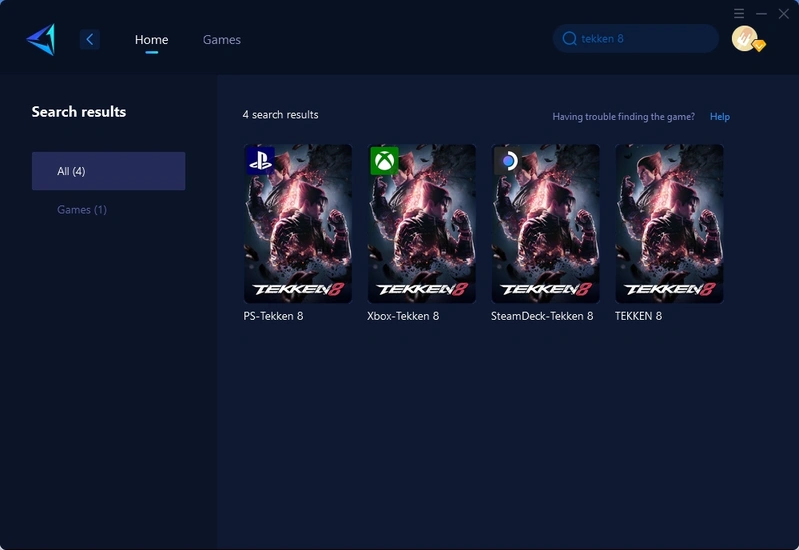
- Search for Tekken 8.
- Select the game server closest to your location.
- Click Boost.
- Launch Tekken 8 directly from GearUP.
The software automatically analyses your network and selects the most efficient available route before you begin playing.
Additional Ways to Reduce Lag
While GearUP can improve network routing, a few additional best practices can further enhance your gaming experience:
- Use a wired Ethernet connection instead of Wi-Fi.
- Close downloads and streaming applications before gaming.
- Keep Windows and network drivers updated.
- Select the closest matchmaking region whenever possible.
- Restart your router periodically to clear network congestion.
- Avoid large downloads while playing online.
Combining these practices with network optimisation can help create a smoother and more responsive online experience.
About GearUP
GearUP specialises in gaming network optimisation for PC, console, and mobile platforms. The company develops technologies that improve online gaming by reducing latency, packet loss, and unstable routing rather than altering gameplay or modifying game files.
Today, GearUP supports thousands of online games and provides optimisation services through a global network of server nodes. Its solutions are available for Windows PCs, mobile devices, gaming routers, and selected console configurations, helping players around the world enjoy more stable multiplayer gaming experiences.
GearUP Product Ecosystem
Although this guide focuses on Tekken 8 for Windows, GearUP supports a wide range of multiplayer titles across multiple platforms.
Its ecosystem includes:
- GearUP Booster for Windows
- GearUP Mobile
- Console network optimisation
- Gaming router acceleration
- Global optimisation servers
- Adaptive Intelligent Routing
- Anti-packet-loss technology
- Worldwide node selection
This broad compatibility makes GearUP useful for players who regularly switch between competitive online games.
Smarter Networking for Better Gaming
As online gaming continues to grow, network optimisation has become an important part of competitive play. Technologies that intelligently route traffic help minimise the effects of congestion, poor routing, and unstable internet connections.
Rather than replacing a quality broadband connection, GearUP complements existing internet services by helping players establish a more reliable route to game servers. For fast-paced titles such as Tekken 8, where milliseconds can determine the outcome of a match, this additional layer of optimisation can make a noticeable difference.
Who Should Use GearUP?
GearUP Booster is ideal for:
- Competitive Tekken 8 players
- Ranked online gamers
- Esports enthusiasts
- Streamers
- Players experiencing high ping
- Users affected by packet loss
- Gamers with unstable matchmaking
- Players connecting to overseas servers
Whether you are new to Tekken or an experienced competitor, a stable network connection can help deliver more consistent online performance.
Where to Download
You can download GearUP Booster using our affiliate partner below:
Affiliate Link
Disclosure: This article contains affiliate links. TechnologyBlog.co.za may earn a commission if you purchase through these links at no additional cost to you. This helps support our independent technology journalism.
Final Thoughts
Tekken 8 rewards precision, timing, and quick reactions, making network performance just as important as player skill. High ping and packet loss can interrupt even the best strategies, particularly during competitive online matches.
GearUP Booster provides a simple solution by optimising the network path between your PC and the game servers. Combined with good networking practices, it can help reduce lag, improve connection stability, and create a smoother online fighting experience for Windows players.