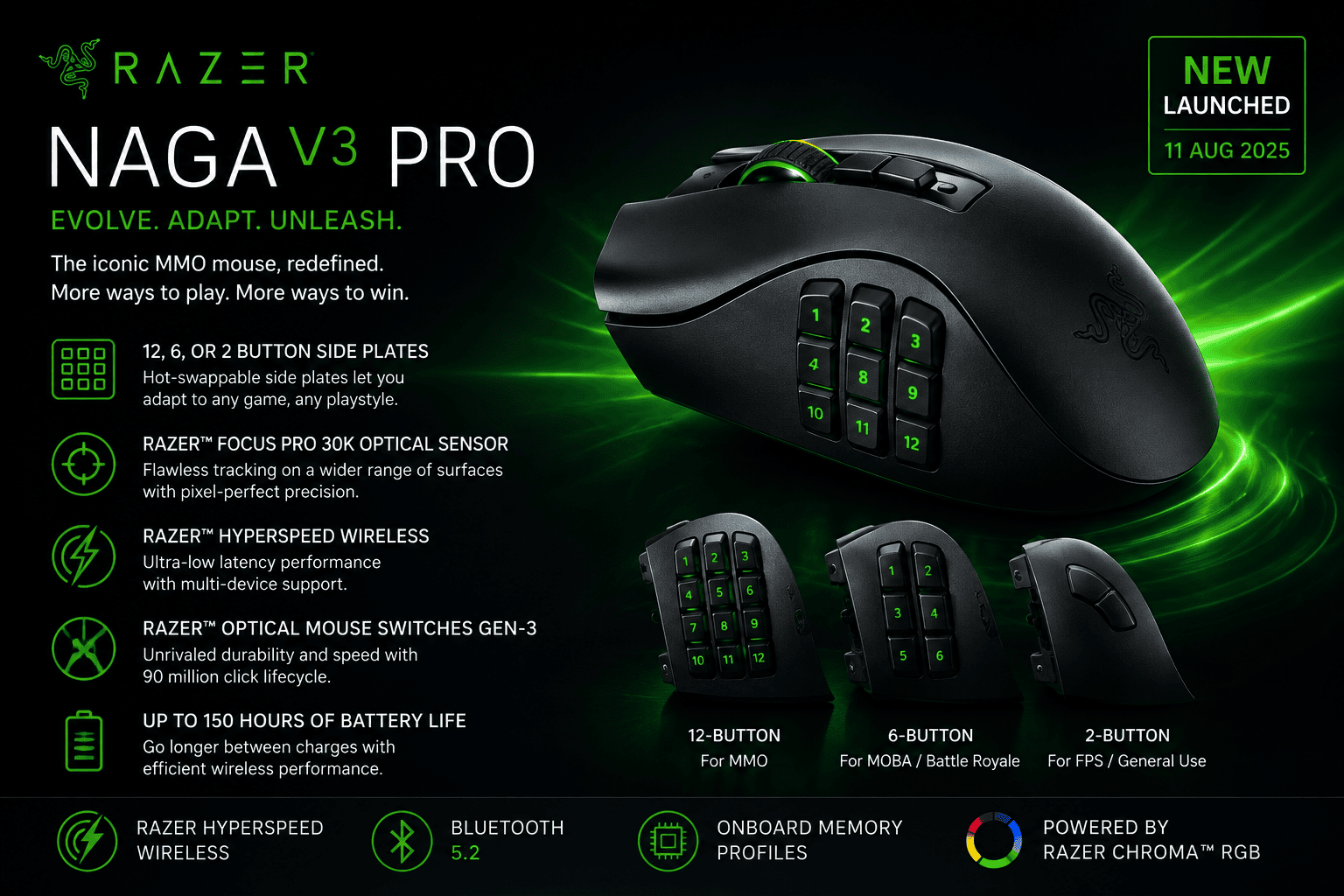
Razer Naga V3 Pro turns one MMO mouse into three with up to 23 programmable buttons
Razer has launched the Naga V3 Pro, updating its long-running MMO gaming mouse with three interchangeable side plates, up to 23 programmable buttons, a new HyperScroll Tilt Wheel Gen-2 and the company’s latest 50,000 DPI optical sensor.
Announced globally on 11 August 2026, the Naga V3 Pro keeps the right-handed ergonomic shape associated with the Naga family. However, Razer is positioning this generation for more than MMOs. The interchangeable controls allow the same mouse to move between MMO, MOBA, battle royale, FPS and general desktop use.
The mouse also introduces some less conventional features. These include a lockable ring-finger button, five onboard profiles and an AI Prompt Master shortcut that can provide one-click access to ChatGPT.
TechnologyBlog.co.za has not tested the Razer Naga V3 Pro. This article therefore focuses on its verified specifications and features rather than making conclusions about comfort, tracking performance or wireless reliability.
Three side plates change how the Naga V3 Pro works
The defining feature remains the interchangeable side-button system.
Razer supplies three magnetic side plates. Users can remove one and attach another without tools, changing the number and layout of thumb controls according to the game they are playing.
The 12-button plate retains the grid that made the Naga recognisable as an MMO mouse. It places a large collection of abilities, macros, inventory commands and other functions under the user’s thumb.
A six-button plate uses a hexagonal arrangement aimed at MOBAs and battle royale games. Razer has designed the layout to reduce how far the thumb needs to travel between individual inputs.
The third plate reduces the layout to two side buttons. Razer targets this configuration at FPS games and everyday computer use, where a 12-button grid may introduce controls the user does not need.
This modular approach is important because the Naga V3 Pro is not simply an MMO mouse with an unusually large number of buttons. Users can physically simplify the controls instead of leaving unwanted buttons disabled through software.
Up to 23 programmable buttons
Razer lists up to 23 programmable buttons on the Naga V3 Pro, depending on the selected configuration.
Two quick-access buttons sit beside the left mouse button and default to DPI adjustment. Razer Synapse can reassign functions, macros and other commands to supported inputs.
Razer has also brought back a ring-finger button.
The company removed this control from the Naga V2 Pro after feedback concerning accidental presses. On the V3 Pro it returns with a physical lock, allowing users to disable it when they do not want another active control beneath the ring finger.
That solution gives users access to the additional button without requiring them to live with accidental inputs in games or applications where it provides little value.
Razer also uses doubleshot moulded construction for the side-button legends. The markings form part of the key construction rather than being printed onto the surface, which should prevent the characters from simply rubbing off through normal surface wear.
Durability in actual long-term use would still require testing.
HyperScroll Tilt Wheel Gen-2 adds a 48-step mode
Another major change sits in the scroll wheel.
The Razer HyperScroll Tilt Wheel Gen-2 offers several scrolling behaviours rather than one fixed mechanical feel.
Standard Tactile Mode provides a conventional 24-step notched scroll. Precision Tactile Mode doubles this to 48 steps, giving the wheel smaller individual increments.
That could prove useful when scrolling through long inventories, weapon selections or lists of abilities where one large movement can otherwise skip past the intended item.
Free-Spin Mode removes the heavily stepped behaviour for rapid scrolling through long pages and menus.
Smart-Reel can automatically change between tactile and free-spinning behaviour according to how quickly the wheel moves. Razer Synapse allows users to adjust the force needed to trigger the transition across five levels.
Scroll acceleration is another software option. It progressively increases scrolling speed when the user turns the wheel more quickly.
The wheel also supports left and right tilt inputs, adding two more available controls.
Focus Pro 50K sensor reaches 50,000 DPI
Razer equips the mouse with its Focus Pro 50K Optical Sensor Gen-3.
The sensor supports sensitivity settings up to 50,000 DPI, tracking speeds up to 930 inches per second and acceleration up to 90G. Razer also claims 99.8% resolution accuracy.
Those specifications describe the sensor’s technical limits. They do not mean most players should actually configure a mouse at 50,000 DPI.
For many users, the more practical additions will come through Synapse.
The Naga V3 Pro supports sensitivity adjustment in single-DPI increments. A Sensitivity Matcher can also help users reproduce a preferred sensitivity from another mouse.
Asymmetric cut-off allows separate lift-off and landing distances across up to 26 levels, while Smart Tracking attempts to maintain a consistent lift-off distance across different surfaces.
Razer also lists a rotation tool that adjusts sensor orientation according to the user’s grip angle.
Optical switches are rated beyond 100 million clicks
The primary buttons use Razer Optical Mouse Switches Gen-4.
Razer rates these switches for more than 100 million clicks and says the fourth generation uses a 12% lighter actuation force.
The durability figure is a manufacturer rating rather than a TechnologyBlog.co.za longevity test.
Optical mouse switches detect activation using light rather than relying exclusively on the physical electrical contacts used by conventional mechanical switches.
That does not automatically make one mouse better than another. However, it changes how the switch registers an input and allows Razer to design around characteristics such as actuation behaviour and rated lifespan.
HyperSpeed, Bluetooth and USB-C provide three connection options
The Naga V3 Pro supports three ways to connect.
Razer HyperSpeed Wireless uses the included 2.4GHz wireless connection for gaming. Razer rates battery life at up to 155 hours under its standard test conditions.
Bluetooth increases the stated maximum to 280 hours.
Those figures should not be interpreted as guaranteed battery endurance. Lighting, connection mode, usage patterns and other settings can affect actual runtime.
The third option uses USB-C. Users can continue playing through the wired connection while charging the battery.
Razer HyperSpeed Multi-Device Support can also allow a compatible Razer keyboard and mouse to share a single wireless dongle, reducing the number of occupied USB ports.
Wireless charging requires additional hardware
The Naga V3 Pro can form part of Razer’s wireless charging ecosystem, but the required charging products are sold separately.
Razer lists compatibility with the HyperFlux V2 Wireless Charging System and Mouse Dock Pro. Users can replace the mouse’s standard cover puck with the appropriate wireless charging puck to enable this functionality.
This distinction matters because wireless charging support does not mean everything required comes inside the standard Naga V3 Pro box.
HyperFlux V2 can provide continuous charging through a compatible mouse mat, while Mouse Dock Pro provides a separate docking location between gaming sessions.
Users who do not buy either accessory can simply charge through USB-C.
AI Prompt Master puts a ChatGPT shortcut on the mouse
One of the more unusual additions is AI Prompt Master.
Razer’s support documentation identifies a dedicated AI Prompt Master button in the Naga V3 Pro’s control layout. The product page describes the feature as providing one-click access to ChatGPT for activities such as brainstorming and summarising content.
The distinction here is important.
This does not mean the Naga V3 Pro contains an AI processor or runs a language model inside the mouse. It acts as a software shortcut that provides faster access to an AI service through the connected computer.
For gaming, that control may be less important than the side plates or sensor. For everyday desktop use, however, it demonstrates how Razer is expanding mouse customisation beyond traditional DPI and macro functions.
Five profiles can stay on the mouse
The Naga V3 Pro stores up to five onboard profiles.
Users can configure button layouts, macros and DPI settings through Razer Synapse, then switch between saved profiles with the profile button on the bottom of the mouse.
Onboard storage becomes particularly useful when moving between computers because the mouse can retain selected configuration information instead of forcing the user to rebuild every layout.
Smart Profiles can also associate configurations with particular games and change to the relevant setup when the software launches.
A user could therefore keep the 12-button plate configured for an MMO, change to six buttons for another title and use a simplified profile with the two-button plate for desktop work.
The Naga remains rooted in MMO gaming
Razer introduced the original Naga family in 2009, and the 12-button thumb grid became its defining characteristic.
The V3 Pro does not remove that identity. Its default 12-button configuration still targets players who need access to large numbers of abilities, macros and commands without moving a hand back to the keyboard.
What changes is the amount of hardware that can adapt around that foundation.
The six-button and two-button plates recognise that many players do not remain inside one game genre. Someone can spend one evening in an MMO and another playing a shooter without necessarily wanting a different mouse on the desk.
That is a more meaningful form of versatility than simply offering dozens of programmable controls that stay permanently attached.
Razer’s ecosystem extends beyond the mouse
The Naga V3 Pro relies heavily on Razer Synapse for deeper configuration, including macros, sensitivity adjustment, scroll-wheel behaviour and profile management.
Razer also operates a wider gaming ecosystem around peripherals, software and connected lighting.
For example, TechnologyBlog.co.za recently covered the Nanoleaf Prismatic Fusion Bundle, which includes integration with Razer Chroma alongside its other gaming and smart-lighting functions.
That kind of integration illustrates how Razer’s software ecosystem can extend beyond a single mouse or keyboard without requiring a direct comparison between hardware brands.
Razer Naga V3 Pro specifications
| Specification | Razer Naga V3 Pro |
|---|---|
| Form factor | Right-handed ergonomic |
| Maximum programmable buttons | Up to 23 |
| Side plates | 3 magnetic interchangeable plates |
| MMO plate | 12 buttons |
| MOBA / battle royale plate | 6 buttons |
| FPS / everyday plate | 2 buttons |
| Sensor | Razer Focus Pro 50K Optical Sensor Gen-3 |
| Maximum sensitivity | 50,000 DPI |
| Maximum tracking speed | 930 IPS |
| Maximum acceleration | 90G |
| Sensor resolution accuracy | Stated 99.8% |
| Main switches | Razer Optical Mouse Switches Gen-4 |
| Switch rating | More than 100 million clicks |
| Scroll wheel | HyperScroll Tilt Wheel Gen-2 |
| Tactile scrolling | 24 steps |
| Precision Tactile | 48 steps |
| Free-Spin Mode | Yes |
| Smart-Reel | Yes |
| Onboard profiles | Up to 5 |
| 2.4GHz wireless | Razer HyperSpeed Wireless |
| Bluetooth | Yes |
| Wired connection | USB-C |
| HyperSpeed battery rating | Up to 155 hours |
| Bluetooth battery rating | Up to 280 hours |
| Play while charging | Yes |
| Wireless charging | Optional accessories required |
| HyperFlux V2 support | Yes |
| Mouse Dock Pro support | Yes |
| AI Prompt Master | Yes |
| Configuration software | Razer Synapse |
Specifications are based on Razer’s current Naga V3 Pro product, support and launch documentation.
Who is the Razer Naga V3 Pro for?
The Naga V3 Pro makes the clearest case for PC gamers who genuinely use a large number of mouse inputs.
MMO players remain the obvious audience because the 12-button grid places an unusually large number of commands under the thumb. The six-button plate then gives the same mouse a less crowded layout, while the two-button plate strips the design back further.
The new scroll wheel also adds practical control rather than simply increasing a specification number. Moving between 24-step, 48-step and free-spinning modes changes how the physical wheel behaves according to the task.
Battery life is another potential strength on paper, particularly the stated 280-hour Bluetooth maximum. However, actual endurance still needs independent testing.
The biggest question is therefore not whether the Naga V3 Pro has enough features. It clearly does.
Prospective buyers should instead decide whether they will actually use the interchangeable side plates, extensive button customisation, advanced scroll modes and software configuration that distinguish the Naga family from simpler gaming mice.
For players who do, the V3 Pro represents a substantial update to a mouse concept Razer has been developing since 2009.