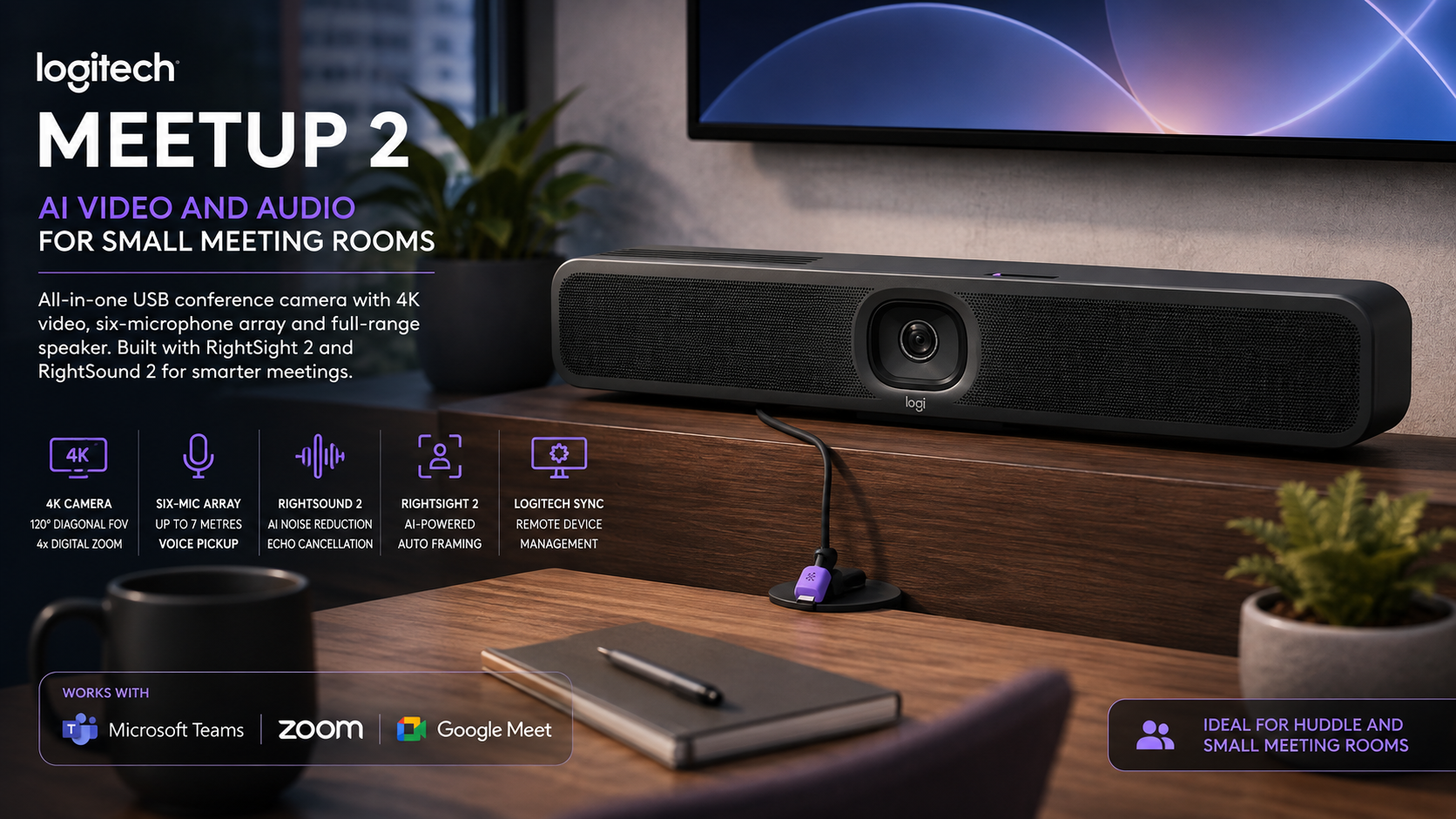
Logitech MeetUp 2 brings AI video and audio to small meeting rooms
The Logitech MeetUp 2 is an all-in-one USB conference camera built for huddle rooms and smaller meeting spaces. It combines a 4K camera, six-microphone array and full-range speaker in one unit. Logitech also adds its RightSight 2 and RightSound 2 technologies for AI-assisted video framing and audio processing.
MeetUp 2 can work with a dedicated meeting-room computer or connect directly to a laptop for bring-your-own-device, or BYOD, meetings. Logitech lists compatibility with popular conferencing platforms such as Microsoft Teams, Zoom and Google Meet. The company also provides remote management through Logitech Sync.
The product appears on Logitech’s South African website and targets huddle and small meeting rooms. Logitech directs local business customers towards its sales and reseller channels rather than publishing a South African retail price on the product page.
South African pricing and retail availability had not been confirmed at the time of publication. TechnologyBlog.co.za has not tested MeetUp 2. This article therefore covers its verified specifications and features rather than providing a performance review.
A 120-degree camera covers small meeting rooms
MeetUp 2 uses a 4K digital PTZ camera with a 120-degree diagonal field of view. Horizontal coverage reaches 113 degrees, while vertical coverage measures 80 degrees. This wide view should help capture people sitting close to the screen in compact meeting rooms.
The camera provides 4x HD digital zoom. It can also pan digitally by up to 48 degrees in either direction at 4x zoom and tilt by up to 32 degrees. These controls allow the system to change framing without moving the physical camera.
Logitech positions MeetUp 2 for huddle and small rooms. Its South African Zoom solutions page places the camera in rooms with up to six participants. Larger spaces may need a system such as Rally Bar Mini or Rally Bar, which Logitech positions for bigger groups.
Room size still matters more than a simple headcount. A six-person group seated across a long table can place greater demands on the microphones than six people sitting close together.
RightSight 2 handles automatic framing
MeetUp 2 includes RightSight 2, Logitech’s AI-assisted video technology. It works through the built-in CollabOS platform and can help manage how participants appear to people joining remotely.
Automatic framing reduces the need for users to adjust the camera every time someone enters or changes position. This can help in shared rooms where employees may not know how to operate the conferencing equipment.
The built-in processing also gives Logitech room to expand the product through software updates. The MeetUp 2 datasheet describes its AI audio and video features as capabilities that can improve over time through regular updates.
That approach makes software support an important part of the product. Businesses buying MeetUp 2 should consider Logitech’s update policy and device-management platform alongside the camera hardware itself.
Six microphones extend pickup to seven metres
Audio gets a substantial share of MeetUp 2’s hardware. The unit contains six omnidirectional digital MEMS microphones that form five adaptive acoustic beams. Logitech specifies a pickup range of up to seven metres.
The microphone system supports acoustic echo cancellation and voice activity detection. It also uses an AI-based noise-suppression algorithm to reduce unwanted background sound.
These features aim to make speech easier to hear without requiring tabletop microphones in a small room. However, the seven-metre figure describes the rated pickup range rather than guaranteed call quality at that distance.
Hard surfaces, air-conditioning systems and other people speaking nearby can all affect meeting-room audio. TechnologyBlog.co.za has not tested how the microphones perform in South African offices or open-plan environments.
RightSound 2 focuses on clearer speech
The microphone array works with RightSound 2, Logitech’s audio-processing system. MeetUp 2 uses it to manage voices and surrounding noise before sending audio to the conferencing application.
Noise reduction can make a significant difference in small rooms. Keyboard sounds, fans and conversations outside the room can distract remote participants even when people inside the room barely notice them.
Audio processing cannot solve every acoustic problem. A room with strong echoes may still benefit from soft furnishings or acoustic treatment. The physical room remains an important part of any video-conferencing setup.
A 55mm speaker handles the remote side of the call
MeetUp 2 contains one full-range 55mm speaker in a bass-reflex enclosure. Logitech rates it at 8W and lists an 83dB SPL sensitivity measurement at one metre.
Integrating the speaker into the same enclosure keeps the meeting table clear. Smaller rooms therefore do not need separate desktop speakers or a conventional conference speakerphone for normal use.
The all-in-one layout also simplifies installation. The camera, microphones and speaker can sit together near the display rather than forcing IT teams to run audio equipment across the room.
Businesses with larger or unusually shaped rooms should still assess whether one front-mounted speaker provides suitable coverage for every seat.
MeetUp 2 supports both PC and BYOD meeting rooms
Businesses can deploy MeetUp 2 in two main ways. A dedicated computer can remain permanently connected in the room, or employees can connect their own laptops when they need to start a meeting.
A PC-based room can provide a more consistent setup because the organisation controls the computer and software. BYOD offers greater flexibility because employees can use the conferencing platform and account already configured on their laptop.
MeetUp 2 does not operate as a standalone video-conferencing appliance on its own. Logitech’s comparison identifies PC and BYOD support but lists no appliance mode for MeetUp 2. Businesses that want a self-contained appliance should look at products designed for that purpose.
This distinction can easily get lost when products use the term “video bar”. MeetUp 2 contains its own CollabOS software for device features and management, but it still relies on connected computing hardware for the meeting application.
Single-cable BYOD needs an optional cable
A standard BYOD installation uses separate connections for the meeting-room display and MeetUp 2. Logitech also supports a cleaner single-cable BYOD configuration through DisplayPort Alt Mode.
That setup requires a compatible Active USB Cable rather than the standard cable arrangement. The optional cable can carry the required data and display connection through one cable between the laptop and room system.
The distinction matters when businesses plan meeting-room cabling. A single-cable desk looks cleaner, but buyers should include the optional accessory in the total installation cost.
The standard package documentation lists a three-metre USB-C to USB-C 2.0 cable. Logitech’s support documentation notes that 4K output requires USB 3.0 or higher, so organisations that specifically want 4K should confirm the cable used in their installation.
Most conferencing platforms also operate below 4K during typical video calls. The camera’s 4K sensor can still help with digital framing and zoom, but buyers should not assume every remote participant will receive a 4K stream.
HDMI input and output provide more installation options
MeetUp 2 includes one HDMI input and one HDMI output. It also has a USB-C 3.1 connection and Gigabit Ethernet. Wi-Fi and Bluetooth Low Energy provide additional connectivity.
The Ethernet or Wi-Fi connection does more than carry meeting traffic. MeetUp 2 can connect to Logitech Sync for remote administration. This lets IT teams manage devices without visiting every meeting room.
Wired Ethernet will often make the most sense for permanent installations. It removes another wireless variable and can provide a more predictable management connection.
The presence of Wi-Fi still gives companies flexibility where running a network cable proves difficult.
Logitech Sync lets IT teams manage rooms remotely
Meeting-room equipment creates an ongoing support burden once a company deploys it across several offices. Logitech Sync gives administrators a central place to monitor supported devices, change settings and deploy updates.
This becomes increasingly useful as an installation grows. Managing one camera manually is simple. Managing 20 rooms across several buildings requires a more structured approach.
Logitech also offers additional Sync functions through paid Essential or Select licences. These can add features such as room insights, remote user-interface access and proactive alerts.
Businesses should therefore distinguish between the management functions available with the hardware and the additional services that may require a separate licence.
Digital signage can use the meeting-room display between calls
MeetUp 2 can also support digital signage through Logitech Sync and compatible platforms such as Appspace. This allows a meeting-room screen to show company information when nobody is using it for a video call.
A business could use the display for internal announcements, branding or room information rather than leaving a blank screen on the wall for most of the day.
Digital signage support depends on the selected deployment and compatible software. Organisations planning to use the feature should confirm the full platform requirements before ordering hardware.
One mount supports several room layouts
Logitech supplies MeetUp 2 with a multi-function mount. It can position the camera on a table, wall or display, while a threaded insert also supports compatible tripods.
This flexibility can reduce the need to order a different mounting kit for every room. One office might place the camera beneath a display, while another could mount it directly to a wall.
MeetUp 2 measures 469.2mm wide, 73.3mm high and 73mm deep. It weighs 1.8kg.
The design also includes cable management and retention features. These can keep USB, HDMI and power connections more secure in shared meeting spaces where employees regularly connect and disconnect laptops.
A manual privacy shutter covers the camera
MeetUp 2 includes a built-in manual privacy shutter. Users can physically cover the camera when the room is not using video.
A physical shutter offers a simple visual confirmation that the camera cannot capture an image. This can be useful in meeting rooms that also host confidential discussions.
Logitech also lists several device-security features. These include AES-128 file-based encryption, device attestation, authenticated API access and key protection through Arm TrustZone and RPMP. A Kensington security slot provides a physical security option.
Businesses should still secure the connected computer and network. Camera security alone does not protect a meeting-room system if the Windows account or conferencing credentials remain exposed.
MeetUp 2 uses recycled plastic in the enclosure
Logitech lists up to 62% certified post-consumer recycled plastic in the plastic parts of MeetUp 2, excluding accessories and packaging. Its paper packaging comes from FSC-certified forests and other controlled sources.
Sustainability figures do not tell buyers how long a device will remain useful. Software support, repairability and whether a product can survive several conferencing-platform changes also affect its long-term environmental impact.
Remote management and software updates could help extend the practical lifespan if Logitech continues adding support and features through CollabOS.
Logitech MeetUp 2 specifications
| Specification | Logitech MeetUp 2 |
|---|---|
| Product type | All-in-one USB conference camera |
| Intended room | Huddle and small meeting rooms |
| Camera resolution | 4K |
| Diagonal field of view | 120° |
| Horizontal field of view | 113° |
| Vertical field of view | 80° |
| Digital zoom | 4x HD |
| Digital pan | ±48° at 4x zoom |
| Digital tilt | ±32° at 4x zoom |
| Microphones | Six digital MEMS microphones |
| Microphone pickup range | Up to 7m |
| Audio processing | AEC, voice activity detection and AI noise suppression |
| Speaker | 55mm full-range, 8W |
| USB | USB-C 3.1 |
| HDMI | 1 × input, 1 × output |
| Ethernet | 10/100/1000 Mbps |
| Wi-Fi | 802.11a/b/g/n/ac |
| Bluetooth | Bluetooth Low Energy |
| Device platform | Logitech CollabOS |
| AI video | RightSight 2 |
| AI audio | RightSound 2 |
| Management | Logitech Sync |
| Privacy shutter | Manual |
| Dimensions | 469.2 × 73.3 × 73mm |
| Weight | 1.8kg |
| Warranty | Two-year limited hardware warranty |
The specifications come from Logitech’s current MeetUp 2 documentation and South African product page.
What comes in the box?
The standard package includes the MeetUp 2 video bar and its multi-function mount. Logitech also includes the power supply, regional power plugs and mounting hardware.
A three-metre USB-C cable comes with the unit, along with two wall anchors and two screws. Logitech prints the quick-start instructions on the box rather than supplying a conventional booklet.
Businesses should confirm any additional cables needed for their planned deployment before installation day. A BYOD room, dedicated PC setup and single-cable configuration can require different cabling.
How MeetUp 2 improves on the original MeetUp
The original MeetUp remains a capable small-room conference camera, but MeetUp 2 changes the focus from a straightforward USB peripheral to a more manageable business device.
The newer model adds RightSight 2 and RightSound 2. It can connect directly to Ethernet or Wi-Fi for remote management, supports digital signage and offers the optional single-cable BYOD workflow. MeetUp 2 also provides a microphone pickup range of up to seven metres.
The older MeetUp has a stated microphone range of about four metres, extending to five metres with its optional Expansion Mic. It also lacks MeetUp 2’s built-in manual privacy shutter and newer AI features.
The original model still has a place where businesses already own the hardware or can acquire it at a much lower price. For a new deployment, MeetUp 2 provides a more modern platform and stronger remote-management capabilities.
Who should consider Logitech MeetUp 2?
MeetUp 2 makes the most sense for businesses equipping huddle spaces and small meeting rooms. Its wide camera, six-microphone array and built-in speaker reduce the amount of separate hardware needed around the display.
It should also appeal to organisations that use several conferencing platforms. A BYOD setup can let employees connect their own laptops instead of forcing every meeting through one dedicated platform.
IT teams managing multiple rooms gain another benefit from Logitech Sync. Central monitoring and firmware deployment can reduce the number of physical visits required for routine maintenance.
MeetUp 2 may not suit every environment. Larger meeting rooms need greater microphone and speaker coverage. Businesses wanting a completely self-contained conferencing appliance should also consider a product such as Rally Bar Huddle rather than MeetUp 2.
South African pricing and availability
Logitech lists MeetUp 2 on its South African website and provides a local Contact Sales option. Its South African partner pages also position the camera as a current solution for huddle and small meeting rooms.
The official South African product page does not publish a rand retail price. Businesses will therefore need to obtain pricing and stock information through Logitech’s local sales or reseller channels.
South African pricing and retail availability had not been confirmed at the time of publication.
Companies requesting quotations should make sure they compare complete installations rather than only the camera price. A deployment may also need a room computer, display, optional Active USB Cable and other mounting or control equipment.
MeetUp 2 offers a clear upgrade over a basic webcam for small meeting rooms. Its 120-degree camera, seven-metre microphone range and integrated speaker cover the core conferencing hardware. RightSight 2, RightSound 2 and Logitech Sync add the management and automation features that become more valuable when a business deploys the same equipment across several rooms.


