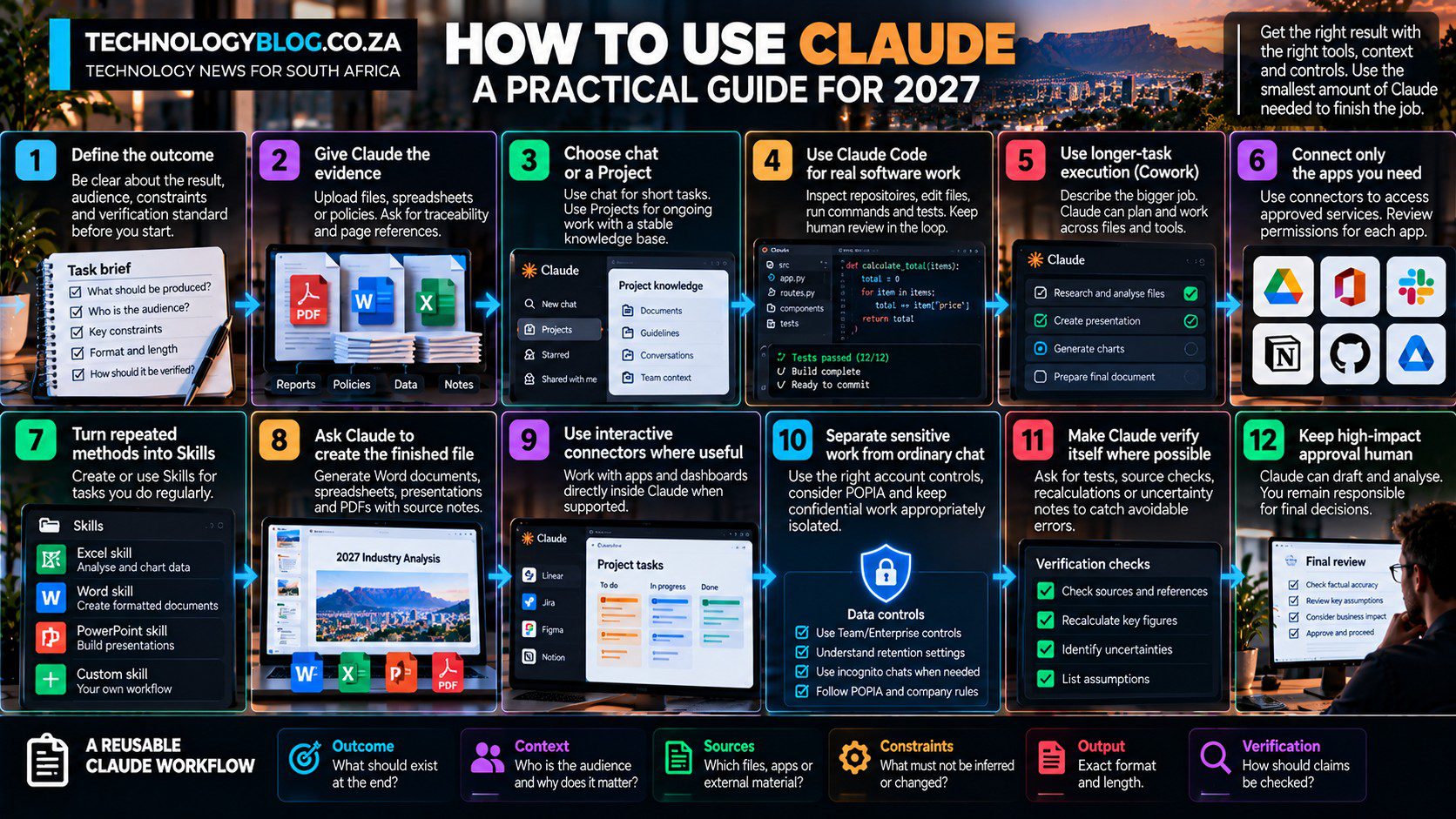
How to Use Claude in 2027: A Practical Step-by-Step Guide
Using Claude well in 2027 starts before the prompt. Anthropic is already removing the need for some Pro and Max users to choose between chat and Cowork: the unified experience lets the user describe the job and Claude decides whether it needs a quick response or longer task execution. The practical skill is therefore choosing the smallest amount of context, tooling and autonomy that can finish the job without making review harder.
That distinction matters because Anthropic has turned Claude into a connected work system. Each extra capability can improve context or automation, but it can also add permissions, hidden assumptions and more output to review. A good workflow uses the smallest amount of Claude necessary to produce a checkable result.
If you need the product overview first, read our complete Claude AI guide.
Step 1: Define the outcome
Start with the result, not the feature. “Help me with this report” leaves too much ambiguity. “Compare these two reports, identify the five material changes, cite the page for each change and produce a 300-word executive summary” gives Claude a measurable target.
A useful instruction usually contains the task, source material, constraints, required output and verification standard.
Step 2: Give Claude the evidence
If the answer depends on a document, spreadsheet or internal policy, provide it. Claude can work with uploaded files and project knowledge, which is usually more reliable than expecting the model to reconstruct details from memory.
Ask for traceability. For example: “List the five clauses that changed and quote the section number supporting each finding.” That makes review much faster.
Step 3: Choose chat or a Project
Use ordinary chat for short, self-contained work. Use Projects when the task will continue across multiple conversations or needs a stable knowledge base.
Projects let users upload documents and maintain focused context. Anthropic’s newer project experience is also moving toward parallel task threads, but it is rolling out in stages. Do not assume every account sees the same interface.
Step 4: Use Claude Code for real software work
Claude Code is designed for interacting with a codebase rather than merely discussing code. It can inspect files, make changes, run commands and tests, and iterate toward a working result.
That does not remove the need for code review. Anthropic’s own usage research found that expert users still achieved better outcomes, even as Claude handled more execution. Good results come from combining agent speed with domain knowledge.
Step 5: Use longer-task execution for multi-step work
On accounts that still show Cowork, it remains the dedicated surface for jobs spanning several steps, files or tools. On Pro and Max accounts already moved to the unified Claude experience, the user can describe the broader outcome in an ordinary conversation and Claude can take on the longer task without a separate mode choice.
Examples include preparing a presentation from source documents, analysing a folder of files, researching a topic and producing a formatted deliverable, or completing a workflow involving connected apps.
Step 6: Connect only the apps you need
Claude connectors can access services such as Slack, Google Drive, Linear and other supported systems. Anthropic says connectors inherit the user’s source permissions.
That is helpful, but permission inheritance is not the same as risk elimination. A user with broad access can still expose broad context to an agent. Connect only what the workflow requires and review what each connector can read or change.
Step 7: Turn repeated methods into Skills
Skills are useful when a task follows the same method repeatedly. A custom skill can include instructions, scripts, examples and resources so Claude knows how to perform a specific workflow.
For example, a newsroom skill could require primary sources, label unsupported claims, preserve qualifiers and output a structured research pack. A finance skill might define a particular modelling method and template.
Step 8: Ask Claude to create the finished file
Claude can create documents, spreadsheets, presentations and PDFs. That is often more useful than copying generated text into another application manually.
For structured work, ask for the deliverable and the audit trail. If Claude changes a spreadsheet, require it to explain the formulas and assumptions. If it creates a presentation, ask for the source note behind each factual slide.
Step 9: Use connectors interactively where useful
Anthropic’s interactive connectors can render apps such as task boards, dashboards or design tools directly inside a Claude conversation. This reduces context switching and lets users review or confirm actions without moving to another tab.
Interactive convenience should not blur responsibility. Users should still know which external system is being modified.
Step 10: Separate sensitive work from ordinary chat
Data handling depends on the account and product. Anthropic’s commercial terms say Team and Enterprise customer data is not used to train Claude by default unless the organisation opts into a development programme. Consumer products have different controls.
Incognito chats are available across Claude plans and are not saved to chat history or memory, and Anthropic says they are not used for training. They are still retained for a period for safety or according to organisation retention settings.
South African organisations should consider POPIA, contractual confidentiality and sector rules alongside Anthropic’s product controls.
Step 11: Make Claude verify itself where the task allows
Ask Claude to run tests, compare outputs with source documents, recalculate totals or identify uncertainties. Verification loops are especially valuable in code, spreadsheets and structured research.
Self-checking is not independent verification, but it catches some avoidable errors before a human sees the result.
Step 12: Keep high-impact approval human
Claude can draft, prepare and analyse. The final approval for consequential decisions should remain with a person who understands the domain and accepts responsibility.
This becomes more important as Cowork, connectors and agentic models take more actions. The difference between a wrong paragraph and a wrong transaction is permission.
Build a workflow you can reproduce next week
Outcome: what should exist at the end.
Context: who the audience is and why the task matters.
Sources: which files, apps or external material Claude may use.
Constraints: what it must not infer or change.
Output: exact format and length.
Verification: how claims or calculations should be checked.
Once that structure becomes familiar, the next step is choosing the right capabilities. See Best Claude Tools and Use Cases for the feature map and Claude for Work for employee workflows.