TP-Link launches Tapo DL130 in Canada with palm-vein access and local biometric storage
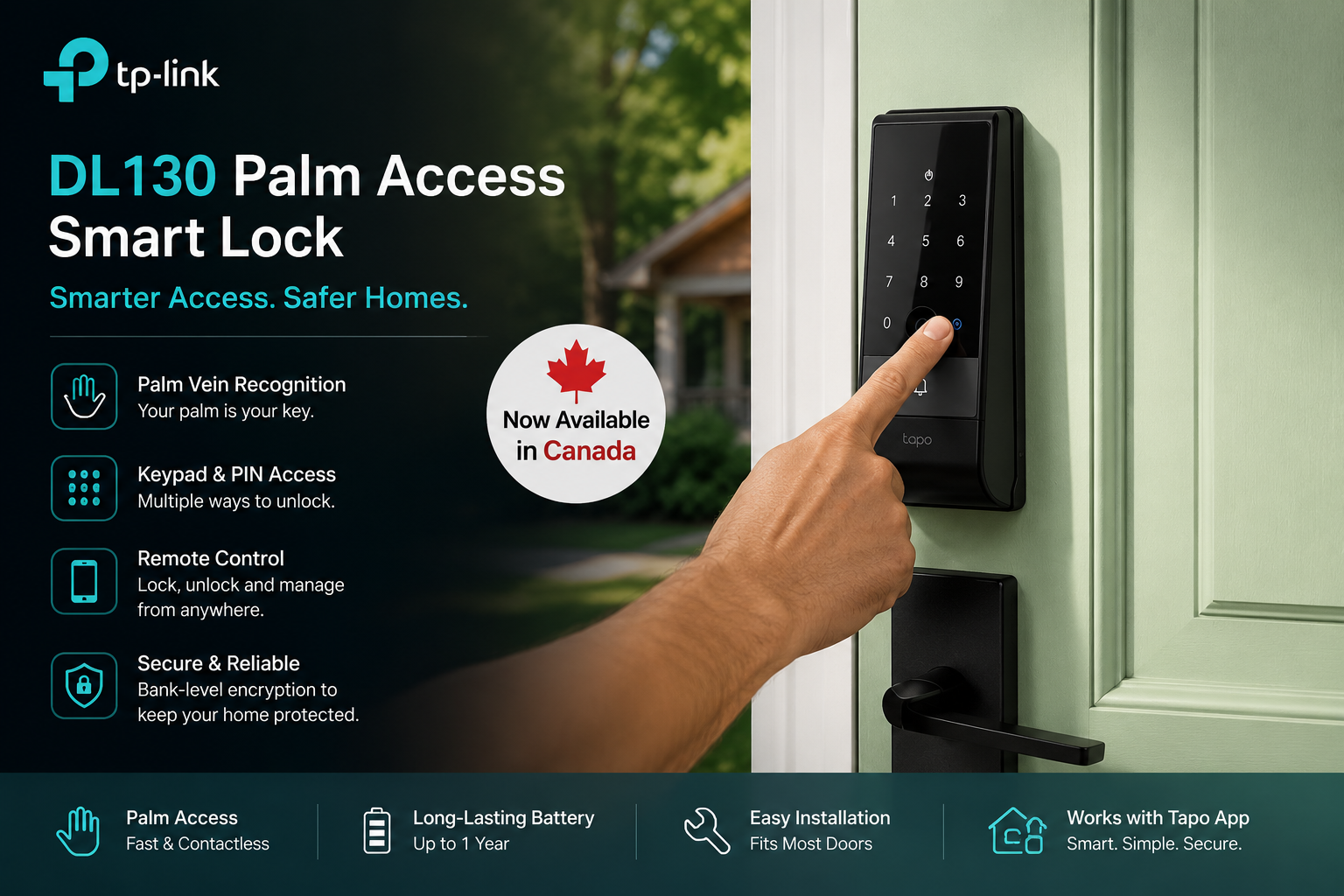
TP-Link has launched the Tapo DL130 Palm Access Smart Lock in Canada, bringing palm-vein recognition to its consumer smart-home range alongside fingerprint, PIN, app and conventional key access.
The Canadian launch took place on 4 August 2026. TP-Link positions the DL130 as the most advanced lock in its current Tapo line-up, with built-in dual-band Wi-Fi, Bluetooth, a rechargeable dual-battery system and biometric information stored locally on the lock rather than uploaded to a cloud biometric database.
The DL130 is a smart deadbolt rather than a complete door replacement. Homeowners still need a compatible door and lock arrangement, and the current Canadian model follows dimensions commonly found in North American residential installations.
TechnologyBlog.co.za has not tested the Tapo DL130. This article therefore examines its verified features and specifications rather than making conclusions about recognition accuracy, physical security or long-term reliability.
Palm-vein recognition is the headline feature
The feature that distinguishes the DL130 from TP-Link’s other Tapo smart locks is its palm-vein recognition system.
Instead of analysing the visible surface of a hand, the sensor reads the vein pattern beneath the skin when a user holds their palm in front of the lock. TP-Link specifies an operating distance of roughly 10 to 15cm and lists recognition times below half a second under its test conditions. The lock can store as many as 50 palm records.
Palm access is contactless, which could make it useful when fingerprint recognition is inconvenient because a person’s fingers are wet, dirty or otherwise difficult for a conventional fingerprint sensor to read.
TP-Link makes strong anti-spoofing claims for the technology, including that a photograph or 3D model cannot reproduce the underlying vein pattern. Those claims come from the manufacturer. TechnologyBlog.co.za has not independently tested the DL130 against biometric spoofing techniques.
Fingerprints provide a second biometric option
Palm recognition is only one way into the house.
The DL130 also contains a fingerprint reader with capacity for up to 100 fingerprints. TP-Link specifies fingerprint recognition at below half a second.
Using both palm and fingerprint recognition gives households flexibility when registering different people. A child, older family member or regular visitor does not necessarily need to use the same authentication method as everyone else.
Importantly, the lock also retains non-biometric methods. Losing access to the biometric system therefore does not automatically mean losing access to the house.
There are seven ways to unlock the DL130
TP-Link lists seven access methods for the Tapo DL130:
- Palm recognition
- Fingerprint
- PIN code
- Tapo app over Wi-Fi
- Tapo app over Bluetooth
- Compatible voice assistant
- Physical key
The physical-key option provides a useful fallback when electronic access is unavailable. Two keys are included with the lock.
The keypad supports as many as 200 access codes, including one-time and scheduled codes. That can be useful when providing temporary access to visitors, cleaners, maintenance workers or other people who should not receive a permanent household PIN.
TP-Link also provides a scramble PIN function. Users can enter additional digits around the correct code to make shoulder-surfing more difficult.
Biometric information stays on the lock
Biometric privacy deserves particular attention because palm and fingerprint records cannot be changed as easily as a compromised password.
TP-Link says the DL130 stores its registered palm and fingerprint information locally on the device rather than uploading those biometric templates to its cloud infrastructure. The manufacturer lists AES-128 encryption as part of its security implementation.
That local-storage architecture reduces one obvious risk: a remote cloud database containing customers’ DL130 palm and fingerprint templates.
It does not mean the entire product operates offline. Remote control, notifications and other connected functions still rely on networking and the Tapo ecosystem.
Households should also protect their Tapo accounts with suitable passwords and available account-security features. A secure biometric reader does not compensate for a poorly protected online account.
Built-in Wi-Fi removes the need for a separate hub
The DL130 connects directly to a home network through Wi-Fi and also supports Bluetooth 5.0.
Its wireless specifications cover 2.4GHz and 5GHz Wi-Fi, giving it more connection flexibility than smart-home products restricted to 2.4GHz networks.
Owners can use the Tapo app to check whether the door is locked, operate the lock remotely and review its activity history. The log records locking and unlocking events, providing a history of access to the entrance.
Remote connectivity still depends on the home’s network infrastructure. If the router or internet service is unavailable, cloud-based remote functions may stop working even while local access methods remain available.
That distinction is particularly relevant to South African households using backup power. Keeping the smart lock operating does not automatically keep the home’s Wi-Fi router and internet connection online.
Auto-locking uses a door sensor
TP-Link supplies a door sensor with the DL130.
The lock can use that sensor to determine whether the door has closed and then automatically engage the deadbolt. It can also provide warnings when the door remains open.
Automatic locking addresses a different problem from biometric authentication. A highly secure unlocking method offers limited benefit if someone simply forgets to lock the door after leaving.
Users can also receive notifications relating to lock activity and unsuccessful access attempts.
Repeated failed attempts can disable electronic entry
The DL130 includes wrong-try protection.
After multiple unsuccessful attempts, TP-Link says the lock can temporarily disable the keypad and biometric sensors and send an alert to the owner’s phone.
This is intended to restrict repeated guessing of access codes and unsuccessful biometric attempts.
As with any smart lock, electronic security is only one layer. Door construction, the frame, strike installation, hinges and the physical locking mechanism still contribute to the security of the entrance.
A built-in doorbell adds another front-door function
TP-Link has also integrated a doorbell into the exterior portion of the DL130.
That means visitors can signal someone inside without requiring another button next to the lock. However, the DL130 should not be confused with a video doorbell. TP-Link does not list a camera as part of the DL130.
Tapo users who also want video coverage can build a broader front-door system around other products in the same ecosystem. TechnologyBlog.co.za’s coverage of the Tapo D225 smart video doorbell explains how that device adds 2K video, local recording, package detection and optional 24/7 recording. Read our Tapo D225 smart video doorbell article
TP-Link has also added integration between compatible Tapo doorbells and smart locks through firmware updates, allowing supported configurations to bring video monitoring and door access closer together.
The main battery can be removed without immediately shutting down the lock
Battery design is another notable part of the DL130.
The lock uses a 7,800mAh rechargeable lithium-ion main battery together with a 500mAh built-in backup battery. The main pack charges through USB-C.
When the main battery needs charging, the backup battery can continue powering the lock while the removable pack is out of the unit.
TP-Link rates the main battery for around one year per charge in Wi-Fi mode, based on laboratory testing involving 20 unlocks per day. Real battery life will vary with wireless conditions, settings, temperature and usage.
If available battery power is exhausted, TP-Link also provides an exterior USB-C emergency-power option. A compatible power bank or device capable of USB-C reverse charging can temporarily supply power to the lock.
The mechanical key provides another fallback.
IP65 applies to the exterior assembly
The outside section of the DL130 carries an IP65 weather-resistance rating.
That rating indicates protection against dust ingress and water jets under the applicable test conditions. TP-Link specifies an exterior operating-temperature range from approximately -30°C to 70°C.
There is an important limitation: the interior assembly is not weatherproof.
The lock therefore remains a residential door product with an exterior and interior side. An installation that exposes the inside assembly to weather would fall outside the intended design.
The DL130 also carries a BHMA Grade 2 certification in the North American market.
Check the door before ordering
Smart locks are not universally interchangeable.
TP-Link lists the DL130 for doors approximately 35mm to 55mm thick, with backset arrangements corresponding to roughly 60mm or 70mm. The product documentation also specifies minimum clearances around the lock installation.
Those dimensions matter particularly because the Canadian DL130 launch targets North American door hardware.
South African doors can use different locks, mortice mechanisms, security gates and door dimensions. A DL130 imported from Canada should therefore not be assumed to fit an existing South African door merely because it uses a deadbolt.
Buyers should measure the existing installation and check TP-Link’s mounting template before purchasing or drilling the door.
Tapo DL130 specifications
| Specification | Tapo DL130 |
|---|---|
| Product type | Smart Wi-Fi deadbolt |
| Palm recognition | Yes |
| Palm capacity | Up to 50 |
| Palm recognition time | Under 0.5 seconds, manufacturer specification |
| Fingerprint recognition | Yes |
| Fingerprint capacity | Up to 100 |
| PIN capacity | Up to 200 |
| App access | Tapo app |
| Remote access | Yes, via Wi-Fi |
| Bluetooth | Bluetooth 5.0 |
| Wi-Fi | 2.4GHz and 5GHz |
| Physical key | Yes, two included |
| Automatic locking | Yes |
| Door sensor | Included |
| Doorbell | Built in |
| Exterior weather resistance | IP65 |
| Certification | BHMA Grade 2 |
| Main battery | 7,800mAh rechargeable lithium-ion |
| Backup battery | 500mAh built in |
| Charging | USB-C |
| Claimed battery life | Up to one year under TP-Link test conditions |
| Smart-home integration | Alexa, Google Assistant and SmartThings |
| Exterior dimensions | 171 × 67.9 × 32.6mm |
| Interior dimensions | 197.9 × 72.8 × 54mm |
| Net weight | Approximately 1.05kg |
Specifications are based on TP-Link’s current Canadian product documentation. Hardware revisions and regional versions can differ.
Alexa, Google and SmartThings integration
TP-Link lists the DL130 as compatible with Amazon Alexa, Google Assistant and Samsung SmartThings.
Voice control can add convenience, but unlocking a physical entrance carries different consequences from switching on a smart light.
Households should therefore review the authentication requirements of their chosen voice platform before enabling lock controls. The security of the complete setup depends on both the lock and the accounts connected to it.
Canadian launch does not confirm a South African retail launch
TP-Link officially announced the DL130’s Canadian availability on 4 August 2026, with the product offered through selected Canadian retailers.
TP-Link South Africa does maintain a DL130 support page, and its local technical documentation includes DL130-related smart-lock guidance. That demonstrates regional support material exists, but a support page alone does not establish that the product has received a South African retail launch.
South African pricing and retail availability had not been confirmed at the time of publication.
That distinction is important for anyone considering importing the Canadian model. Door compatibility, warranty coverage, support arrangements and the exact regional hardware version should all be confirmed first.
Palm recognition expands what a residential smart lock can use as a key
The Tapo DL130’s most interesting development is not remote unlocking. Wi-Fi-connected locks have offered that functionality for years.
Instead, the DL130 adds another form of biometric identity to the front door while keeping fingerprints, PIN codes, app control and a physical key as alternatives. Local biometric storage also addresses an obvious privacy concern around putting permanent biological identifiers into a cloud database.
The technology still needs to prove itself in everyday use. Recognition reliability, long-term mechanical durability and resistance to sophisticated attacks require independent testing rather than manufacturer specifications alone.
For South African buyers, there is another immediate consideration: this is currently a Canadian regional launch, not a confirmed local retail release. Anyone looking at an imported DL130 should check the door measurements and regional support arrangements before treating it as a drop-in replacement for an existing lock.