Logitech MX Anywhere 3S for Mac brings 8,000 DPI tracking and quiet clicks to Apple users
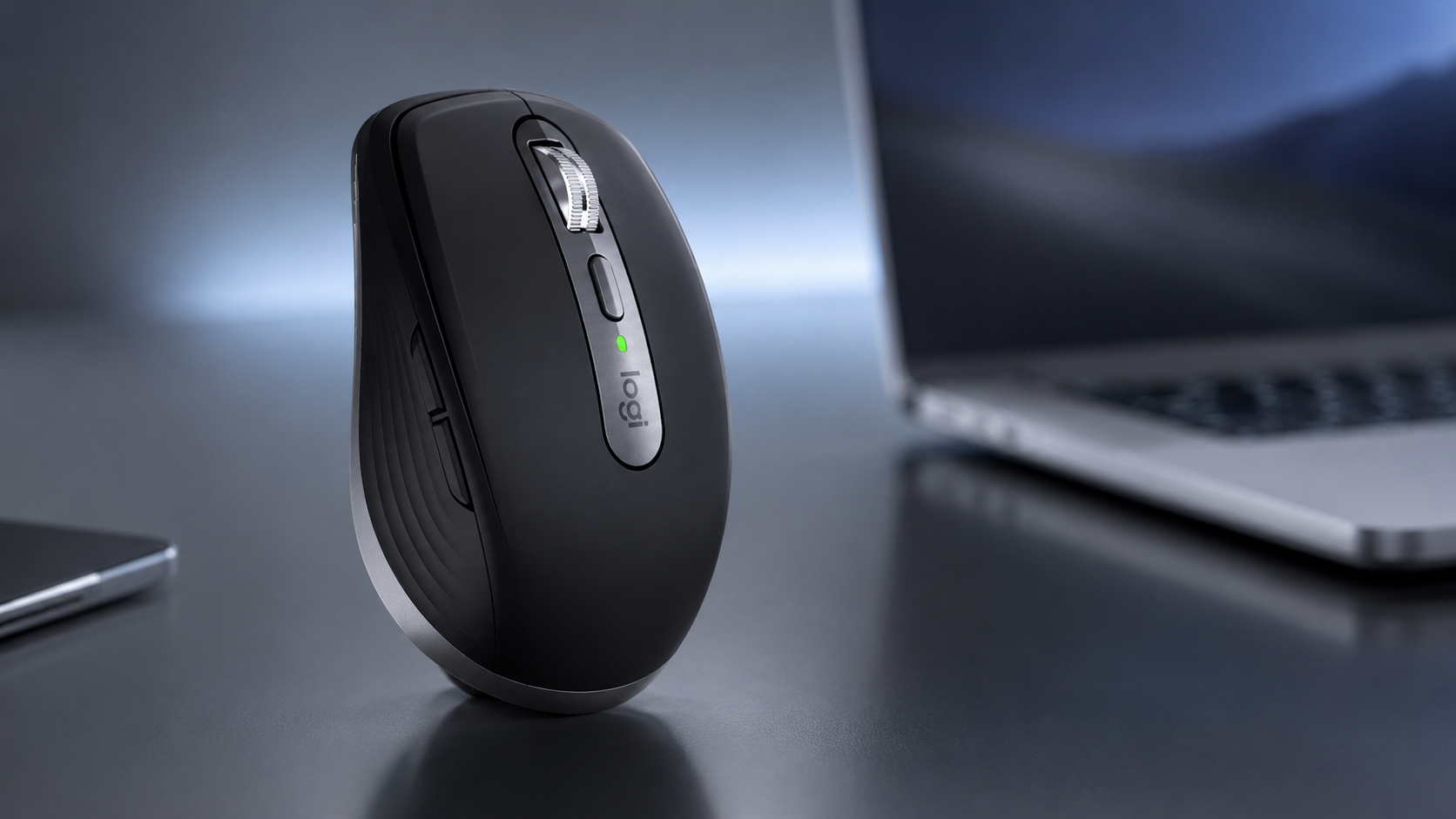
Logitech’s MX Anywhere 3S for Mac is a compact wireless productivity mouse aimed at MacBook, iMac and iPad users who want something more configurable than a basic Bluetooth mouse. Its main features include an adjustable 8,000 DPI sensor, MagSpeed scrolling, quieter buttons and the ability to pair with up to three Apple devices over Bluetooth Low Energy.
The mouse forms part of Logitech’s MX productivity range and received its Mac-focused treatment as part of a wider expansion of the company’s Apple-oriented peripherals in 2024. Logitech introduced the MX Anywhere 3S for Mac globally in May 2024 with a US launch price of $79.99.
TechnologyBlog.co.za has not tested the MX Anywhere 3S for Mac. This article therefore focuses on its verified specifications and features rather than providing a performance review.
8,000 DPI tracking works on more than a desk
One of the MX Anywhere 3S for Mac’s headline specifications is its Darkfield sensor, which supports sensitivity settings up to 8,000 DPI. Logitech also rates the mouse for tracking on surfaces including glass.
The 8,000 DPI figure should not be confused with an “8K” display resolution. In this context, DPI describes mouse sensitivity. A higher setting lets the pointer travel further across the screen for a smaller physical movement of the mouse, which can be particularly useful with high-resolution or multiple displays.
Logitech configures the MX Anywhere 3S at 1,000 DPI by default. Users can extend its sensitivity to as much as 8,000 DPI through the Logi Options+ software.
The ability to track on glass is also relevant to the mouse’s portable positioning. Travellers and hybrid workers may not always have access to a conventional desk or mouse mat.
MagSpeed wheel switches between precise and fast scrolling
The MX Anywhere 3S for Mac uses Logitech’s MagSpeed scroll wheel. It supports line-by-line ratchet scrolling for precise navigation as well as a free-spinning mode for moving quickly through long documents, spreadsheets and web pages.
Logitech rates the wheel for scrolling as many as 1,000 lines per second. Users can switch scrolling modes manually, while Logi Options+ provides additional control over the wheel’s behaviour.
Horizontal scrolling is also available by holding a side button while turning the wheel. That can be useful when working with wide spreadsheets, editing timelines or navigating large documents.
Quiet clicks are one of the main 3S upgrades
Logitech added its Quiet Click technology to the MX Anywhere 3S generation. The company describes the design as producing less click noise while retaining tactile feedback.
That change distinguishes the 3S from the older MX Anywhere 3 alongside the move from a 4,000 DPI sensor to an 8,000 DPI unit. Logitech lists these quieter switches and the higher-resolution sensor among the main differences between the two generations.
Reduced click noise may be useful in shared offices, libraries and video meetings, although TechnologyBlog.co.za has not independently measured the mouse’s noise output.
Built around Macs and iPads
The Mac edition differs from the standard MX Anywhere 3S mainly through its Apple-focused positioning and software configuration.
Logitech provides Mac-specific customisation through Logi Options+ and offers finishes intended to complement Apple hardware. The South African product page lists Space Gray, while Logitech also markets a Pale Grey version internationally.
The mouse can pair with up to three Apple devices running macOS or iPadOS using Bluetooth Low Energy. An Easy-Switch button on the underside changes between paired devices.
This makes the mouse particularly relevant to someone who works on, for example, a MacBook during the day and an iPad at another desk.
Logi Options+ adds deeper configuration. Users can alter tracking speed, reassign buttons and set different functions for individual applications. Logitech provides examples including meeting controls for Zoom and Teams, navigation commands in browsers and undo or redo functions in productivity and creative software.
Logitech Flow can also move the cursor between compatible computers and supports copying and pasting content between them when Options+ is installed on both systems.
USB-C charging and up to 70 days of battery life
The MX Anywhere 3S contains a rechargeable battery and charges through USB-C.
Logitech rates it for up to 70 days of use from a full charge, although actual endurance depends on usage and operating conditions. Its support documentation also states that a short charge can provide enough power for substantial additional use.
The ability to continue using the mouse while it charges reduces the inconvenience of a depleted battery, particularly for people carrying it between home, office and client sites.
Retail listings for the Mac model specify a USB-C-to-USB-C charging cable and documentation in the package.
Logitech MX Anywhere 3S for Mac specifications
| Specification | Logitech MX Anywhere 3S for Mac |
|---|---|
| Product type | Compact wireless productivity mouse |
| Sensor | Darkfield high-precision sensor |
| Maximum sensitivity | 8,000 DPI |
| Default sensitivity | 1,000 DPI |
| Connectivity | Bluetooth Low Energy |
| Multi-device pairing | Up to three Apple devices |
| Scroll wheel | MagSpeed |
| Scrolling modes | Ratchet and free-spin |
| Main buttons | Quiet Click |
| Additional controls | Back/forward buttons, wheel mode button, Easy-Switch |
| Charging | USB-C |
| Rated battery life | Up to 70 days |
| Software | Logi Options+ |
| Primary platforms | macOS and iPadOS |
| Colours | Space Gray and Pale Grey, depending on market |
Specifications are based primarily on Logitech’s product and support documentation. Battery life is a manufacturer rating and will vary with use.
MX Anywhere 3S for Mac versus the standard MX Anywhere 3S
Buyers should pay attention to the wording of the product name because Logitech also sells a standard MX Anywhere 3S.
The core hardware features overlap heavily. Both versions use an 8,000 DPI sensor, MagSpeed scrolling and quiet clicks. However, Logitech positions the standard model as a multi-platform mouse supporting Windows, macOS, ChromeOS and Linux, while the Mac version concentrates on Bluetooth connectivity to Apple hardware and Mac-specific Logi Options+ customisation.
The regular MX Anywhere 3S is also compatible with Logitech’s Logi Bolt USB receiver, although Logitech does not include that receiver with the standard consumer model.
For someone who works exclusively within the Apple ecosystem, the Mac edition therefore offers the more targeted package. Users who regularly move between Windows, Linux and macOS machines should compare the two versions carefully before buying.