Yealink MeetingBar A10 brings 4K AI video to small meeting rooms
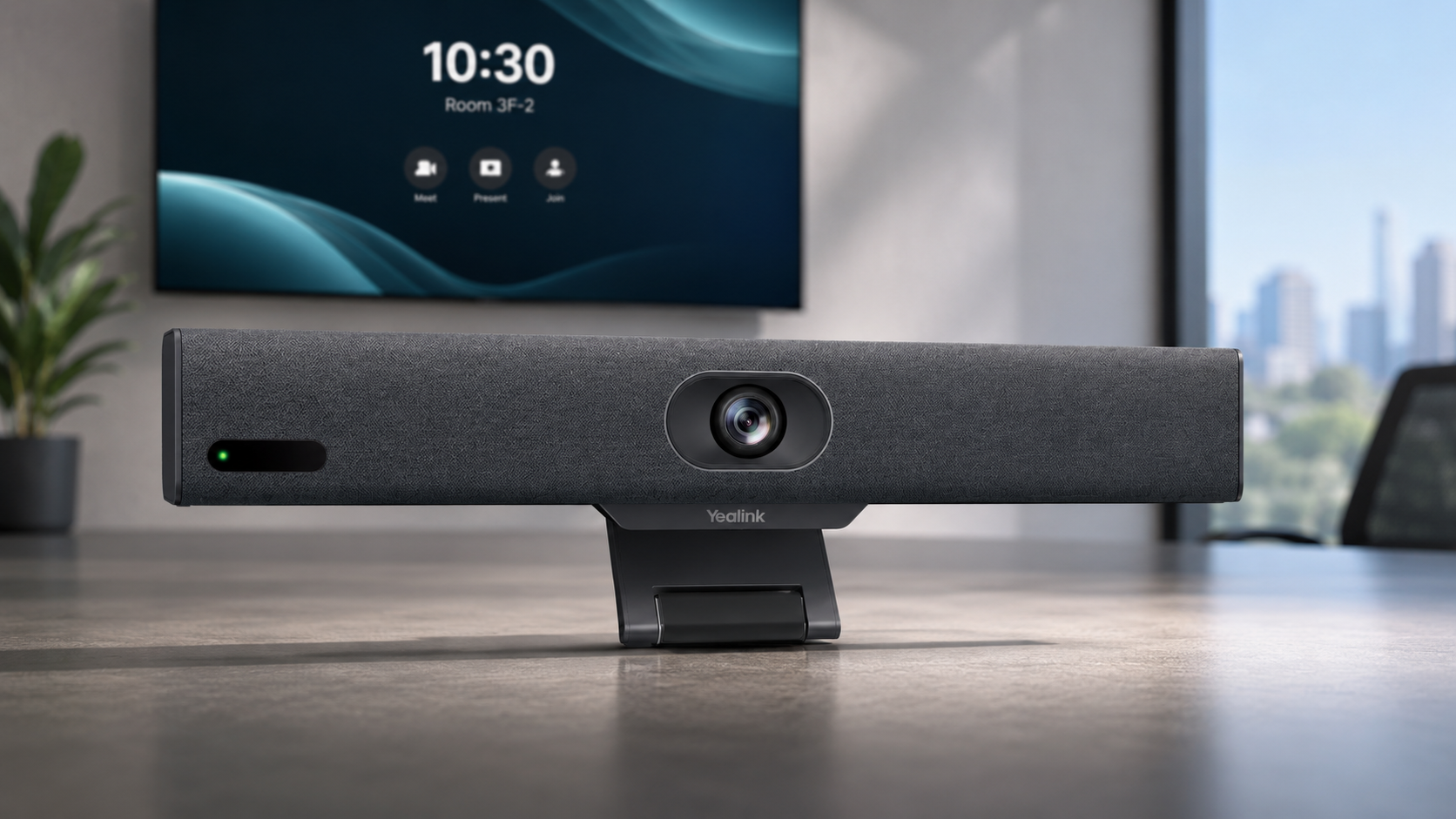
The Yealink MeetingBar A10 is an all-in-one Android video conferencing bar designed for home offices, focus rooms and small huddle spaces. It combines the meeting-room computer, camera, microphone array, speaker, Wi-Fi and Bluetooth in one compact unit, reducing the amount of separate hardware needed around a display.
Its headline hardware includes a 4K camera with a 120-degree diagonal field of view, an eight-microphone MEMS array and an electric privacy shutter. Yealink also builds Auto Framing and Speaker Tracking into the A10, while the platform supports native meeting-room deployments as well as a device mode for connecting a computer.
TechnologyBlog.co.za has not tested the MeetingBar A10. This article therefore focuses on its verified specifications, deployment options and practical limitations rather than presenting a performance review.
A single video bar replaces several room components
Traditional meeting-room installations can require a separate PC, camera, microphones and speaker system. The MeetingBar A10 integrates those components into the bar itself, alongside its wireless networking and Bluetooth hardware.
Yealink lists dimensions of about 380 × 55 × 55mm, making the A10 considerably smaller than video systems intended for larger boardrooms. A television clamp is also integrated into the design.
For a basic installation, businesses still need a suitable display, power, network connectivity and the appropriate conferencing service or account. An all-in-one bar therefore simplifies the room but does not eliminate the surrounding infrastructure.
4K camera uses a wide 120-degree field of view
The A10 contains a 4K camera with a 120-degree diagonal field of view and 105-degree horizontal field of view. Yealink also lists 4× e-PTZ capability, allowing the system to electronically adjust framing without using a mechanical pan-and-tilt camera.
Auto Framing can adjust the shot according to the people in the room, while Speaker Tracking shifts attention towards the person speaking. Multi-focus framing is also listed, and Zoom deployments can use Smart Gallery.
The “4K camera” description should not be confused with a guarantee that every video meeting will stream at 4K. Yealink’s A10 specifications list meeting-video resolutions including 1080p30 and 720p30. Actual call quality will also depend on the conferencing platform, network conditions and remote participants.
Eight microphones cover compact meeting spaces
Yealink equips the MeetingBar A10 with an array of eight MEMS microphones. Its current specifications list a pickup distance of up to 4.5 metres, with a 3.5-metre high-quality pickup distance.
The audio system supports full-duplex communication, so participants should be able to speak and hear remote attendees at the same time rather than having one side cut out while the other speaks. Yealink also applies its AI-based noise cancellation to reduce distractions such as keyboard sounds and other background noise.
Those specifications suit the A10’s focus on compact spaces. Organisations furnishing larger conference rooms should look at systems with longer microphone pickup distances or support for additional room microphones.
Microsoft Teams, Zoom and device-mode meetings
Yealink provides MeetingBar A10 configurations for Microsoft Teams Rooms and Zoom Rooms, while its current specification page also lists RingCentral certification.
This makes the A10 different from a simple USB webcam. In a native room deployment, the bar runs the conferencing environment itself instead of relying on a permanently attached meeting-room laptop.
Device Mode provides another option. A user can connect a computer and use the room’s camera and audio hardware with meetings running from the computer. Yealink also supports wired USB-C content sharing on current A10 software.
Businesses should confirm their intended platform, licensing and management requirements before ordering. The physical MeetingBar is only one part of a managed Teams, Zoom or other conferencing deployment.
WPP30 adds wireless content sharing
Yealink’s optional WPP30 Wireless Presentation Pod lets users connect the pod to a laptop and share content wirelessly with the meeting-room system.
Whether the WPP30 comes with the A10 depends on the bundle. This distinction matters because several MeetingBar A10 packages are available in the South African channel.
Kathea currently lists an A10-010 package with the VCR11 remote control, while its A10-015 bundle adds the WPP30. The A10-025 package combines the MeetingBar with the CTP18 touch controller and WPP30.
Buyers should therefore check the complete SKU rather than assuming every MeetingBar A10 box contains the same accessories.
CTP18 can move meeting controls to the table
The optional Yealink CTP18 provides a dedicated touchscreen interface for controlling meetings. When purchased as part of a compatible combination kit, Yealink’s installation documentation says the controller and A10 can arrive paired.
This type of configuration can make more sense in a permanent meeting room because users do not need to rely solely on a remote control or reach towards the display.
It also adds another component to purchase, power and manage, so very small installations may prefer the simpler A10 and remote-control combination.
Electric privacy shutter provides a physical camera barrier
A conferencing camera can remain installed in a room throughout the working day, making camera privacy an important consideration. The MeetingBar A10 includes an electric privacy shutter that physically covers the camera lens.
A physical cover provides a more visible indication that the camera cannot see the room than relying only on an application’s software camera indicator.
It does not address microphone privacy or broader conferencing security. Businesses still need suitable account controls, firmware management and network policies.
Remote management targets business IT teams
The A10 supports Yealink’s remote-management platforms as well as management through Microsoft and Zoom environments. Yealink lists its web portal, Yealink Device Management Platform, Yealink Management Cloud Service, Microsoft Teams Admin Center and Zoom Device Management among the available administration options.
Central management becomes more important when a company deploys video bars across multiple offices. IT teams can use supported platforms to monitor devices, configure settings, deploy updates and investigate problems without travelling to every room.
Yealink MeetingBar A10 specifications
| Specification | Yealink MeetingBar A10 |
|---|---|
| Product type | All-in-one Android video collaboration bar |
| Intended rooms | Home office, focus and small huddle rooms |
| Camera | 4K |
| Diagonal field of view | 120° |
| Horizontal field of view | 105° |
| Camera movement | 4× e-PTZ |
| Video features | Auto Framing, Speaker Tracking, Multi-focus Framing |
| Zoom-specific feature | Smart Gallery |
| Privacy | Electric camera shutter |
| Microphones | 8 × MEMS |
| Maximum listed pickup | 4.5m |
| High-quality pickup distance | 3.5m |
| Audio | Full-duplex with AI noise cancellation |
| Wireless | Wi-Fi and Bluetooth |
| Content sharing | Wired USB-C; WPP30 wireless sharing supported |
| Platforms | Microsoft Teams Rooms, Zoom Rooms and supported device modes |
| Dimensions | Approximately 380 × 55 × 55mm |
Specifications are based on Yealink’s current product documentation and South African channel information.
MeetingBar A10 versus the newer MeetingBar A25
The A10 remains listed in Yealink’s current MeetingBar range, but the company now also offers the newer MeetingBar A25 for premium focus and huddle rooms.
The difference is substantial. The A25 uses a triple-camera system with a 151-degree horizontal field of view, an eight-microphone array with a stated five-metre pickup range and a 10W speaker. Yealink also bases the A25 on Android 13 and its newer Microsoft Device Ecosystem Platform architecture.
The A10 instead remains Yealink’s more straightforward entry option for compact rooms. Businesses planning a new installation should compare both rather than assuming the older A10 is automatically the most appropriate choice.
South African availability
The MeetingBar A10 has a clear South African channel presence. Kathea lists multiple A10 configurations and describes itself as a specialist value-added distributor serving Southern Africa.
The choice of bundle may matter more than the basic bar itself. Businesses should confirm whether they require only the A10 and remote control, wireless presentation through the WPP30, or a more complete room package with the CTP18 touch controller.
For smaller South African meeting rooms already standardised on Teams or Zoom, the MeetingBar A10 provides a relatively compact way to combine the camera, microphones, speaker and conferencing computer. Buyers planning a fresh rollout should nevertheless compare it with the newer A25, particularly where a wider camera view and newer platform architecture justify the upgrade.